
Turn Your Vision into Success, Let It Fly with Us
Ensure Your Business Is Secure, Compliant & IT-Ready
Signs Your Business Has Outgrown Its IT
Table of Contents
Executive Summary
- Growing businesses may outgrow IT systems that were once reliable and easy to manage.
- Frequent IT problems, slow systems and unreliable internet can reduce productivity.
- Unapproved software and personal tools can create security risks and data protection risks.
- Weak backups, poor access controls and outdated devices can leave the business vulnerable.
- Difficult onboarding, remote working and reliance, on one person are important warning signs.
- Businesses should regularly review businesses security, devices, software, backups and IT processes.
- The guide provides a self‑assessment and a practical 30‑day IT improvement plan.
- The goal is to help businesses build a more reliable and scalable IT environment
Who This Guide Is For
- UK small business owners and directors need IT solutions.
- Businesses experiencing IT problems or growing technology needs should consider a plan.
- Businesses with, around 5–50 employees want to improve their IT setup.
- Anyone unsure whether current IT systems can support business growth should test their systems.
1. Your IT Problems Are Becoming More Frequent
One of the signs is that technical problems are no longer occasional.
You may notice:
- Computers frequently freezing or crashing
- Internet regularly becoming slow or unreliable
- Email problems affecting staff
- Employees repeatedly losing access to systems
- The same IT issue happening again and again
- Staff spending much time waiting for technology to work
Why it matters:
Repeated IT problems reduce productivity and can eventually affect customers and revenue.
What to do:
Keep a record of recurring problems. If the same issues continue, investigate the underlying cause than repeatedly applying quick fixes.
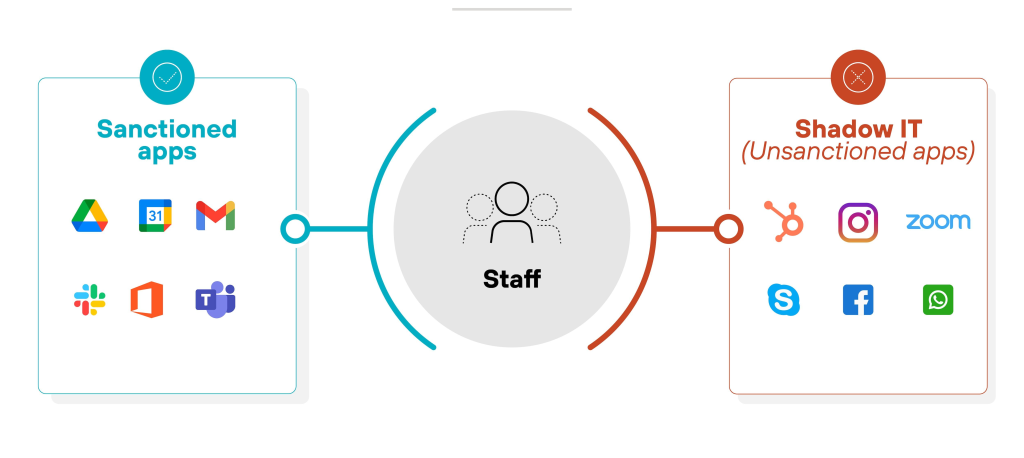
2. Employees Are Finding Their Own IT Solutions
This is a major warning sign
Employees may start using:
- Personal email accounts
- Unapproved cloud storage
- WhatsApp for business documents
- Devices without security controls
- Unapproved software and applications
- This is sometimes called shadow IT.
Why it matters:
Business information may be stored outside your control making security, access management and data protection more difficult.
Better approach:
Provide approved tools and make it easy for employees to use them correctly.
3. Your IT Security Is Becoming Difficult to Manage
As the business grows managing security manually becomes harder.
Warning signs include:
- Not all users have MFA enabled
- Former employees have accounts
- Shared administrator passwords
- No clear list of who has admin access
- Devices are not consistently updated
- Antivirus/endpoint protection is inconsistent
- You cannot easily see who accessed important information
Security should be treated as an ongoing process rather than a one-time setup. Your Microsoft 365 guide for example recommends MFA, separate administrator accounts, least-privilege access, audit logging and restricted sharing as baseline controls.
4. Your Business Has No Reliable Backup Strategy
As the business grows managing security manually becomes harder.
You should be concerned if:
Nobody knows what is actually backed up
Backupsre not automated
Backups have never been tested
Important files exist only on one computer
You have no recovery plan, for ransomware or accidental deletion
A proper backup strategy should include automated backups and regular recovery testing. Your existing guide specifically highlights deletion, ransomware and retention gaps as reasons businesses need additional backup protection.

5. New Employees Are Difficult to Set Up
Ask yourself:
“How long does it take to give an employee everything they need to start working?”
If onboarding requires creating accounts configuring computers, requesting permissions and installing software one device at a time your IT processes may not scale well.
A growing business should have:
An onboarding process
Defined user roles
Standard software
Appropriate access permissions
Secure device configuration
A documented off-boarding process
6. Employees Cannot Work Effectively Remotely
Hybrid and remote working can show problems in an organisations IT setup.
- Warning signs are:
- Employees cannot securely access files remotely
- VPN problems
- Slow remote systems
- Personal devices being used without controls
- No central device management
- Difficulty controlling access outside the office
For growing businesses, cloud services, MFA, device management and proper access policies can make working much easier to manage.
7. Your Technology Is Holding Employees Back
Technology should help employees work faster. Not create work.
- Signs are:
- Employees repeatedly entering the information
- Manual spreadsheets controlling important processes
- Too many disconnected applications
- Slow computers
- Lack of collaboration tools
- Employees spending hours on repetitive tasks
If staff are creating workarounds because your systems cannot support normal business processes it may be time to review your IT setup.
Quick Self-Assessment
| Warning Sign | Risk Level |
|---|---|
| Frequent recurring IT problems | High |
| No reliable backups | High |
| Former employees still have access | High |
| Shared admin accounts/passwords | High |
| Employees using unauthorised software | Medium–High |
| Difficult remote working | Medium |
| Manual onboarding/offboarding | Medium |
| IT depends on one person | High |
| Old or unsupported devices | High |
| No IT documentation | Medium–High |
Quick Self-Assessment
| Time | Priority |
|---|---|
| Days 1–7 | Identify IT problems, users, devices and critical systems |
| Days 8–14 | Review MFA, passwords, admin access and backups |
| Days 15–21 | Review devices, software, licences and remote working |
| Days 22–30 | Document processes and create a longer-term IT improvement plan |
Final Checklist
About This Guide
This guide, “Signs Your Business Has Outgrown Its IT” was written by Computer Support Centre to help UK small business owners and directors see when their existing IT setup no longer fits their growing business. It highlights warning signs such as frequent IT problems, security difficulties, unreliable backups, poor remote working and outdated processes. I wrote this guide in simple non‑technical language so that business decision‑makers can quickly see their IT risks. The guide also gives steps, a quick self‑assessment and a 30‑day IT improvement plan. I aim to help businesses spot weaknesses early and take steps toward a safer more reliable and more scalable IT environment.
Conclusion
When a business grows IT must grow with it. Frequent technical problems, security concerns, unreliable backups, difficult onboarding and poor remote working all signal that the existing IT setup no longer fits the purpose. Spotting these signs early lets a business cut risks boost productivity and avoid disruption. I recommend that businesses first protect systems strengthen security, document their IT and build reliable processes. A well‑planned IT environment provides a foundation, for future growth. The key is to review IT and make improvements before small problems become major business issues.