 Skip to content
Turn Your Vision into Success, Let It Fly with Us
Ensure Your Business Is Secure, Compliant & IT-Ready
How Often Should a Business Back Up Data? A UK SME Guide
Table of Contents
Why Backup Frequency Matters
- You may say, “We have backups,” but it is not the same as saying, “We can recover.”
- Data loss is costly for SMEs in the UK (not through being afraid) due to:
- mount of downtime.
- The amount of financial exposure.
- Their level of accountability under GDPR.
- Their ability to claim against insurance.
- This guide will help clarify the effects of backup frequency on the above points
What Does “Backup Frequency” Actually Mean?
Backup frequency can be defined as the frequency that you create a backup or copy of your data.
Examples of backup frequencies include:
Daily: Most Small to Medium Enterprises (SME’s) will create one backup every 24 hours;
Hourly: This is common for data that changes rapidly (such as databases or live transactions); and
Continuous: Continuous or almost continuous backup can be found in systems that are considered critical.
As backup frequency increases, the amount of data lost when there is a problem will decrease; however, this will also utilise more storage and increase the chances of system performance degradation if not managed properly.
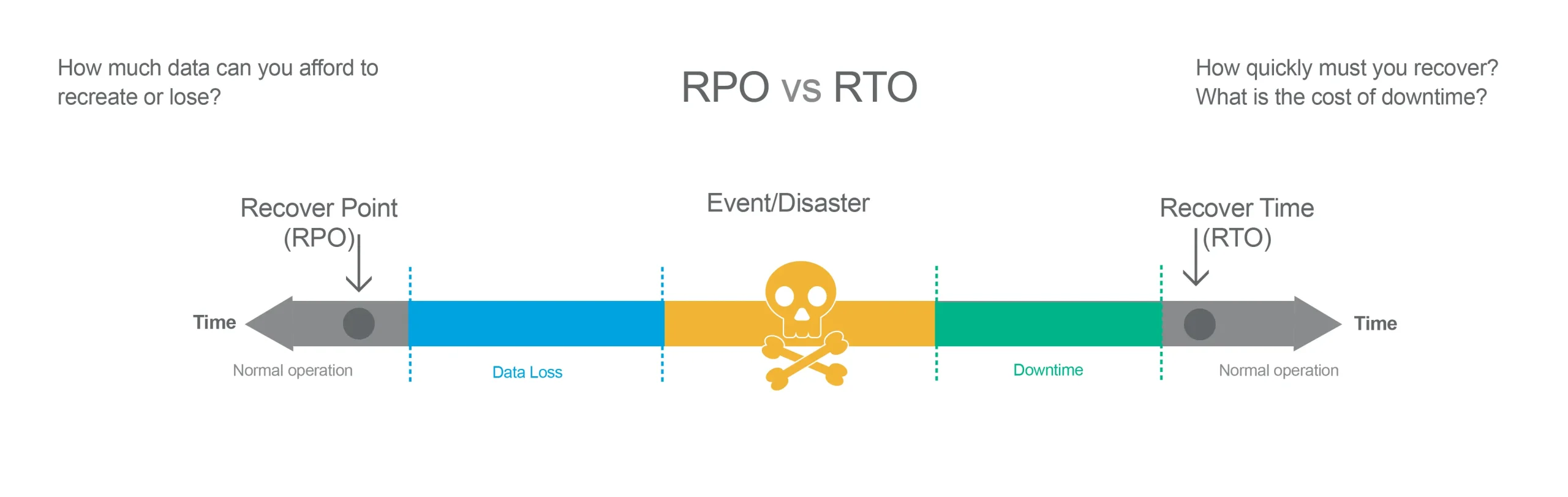
Understanding RPO and RTO
RPO – Recovery Point Objective
- “How much data are we willing to lose?”
- Example wasted back up data is one full day worth of data, and has a maximum thirty-day retention period.
RTO – Recovery Time Objective
- “How fast do we need to be up and running again?”
- Example two hours compared to two days
Practical illustrations:
Accountant’s company versus retail company versus a manufacturing company
How Different Types of Businesses Should Think About Backup Frequency?
Very Small Office (1–5 staff)
- Relatively low complexity.
- Will tolerate some disruption in system access.
Growing SME (10–50 staff)
- Higher data volume
- Less tolerance for downtime
Established SME (50–250 staff)
- High compliance requirements.
- Will rely on operations for data access.
- Will require insurance coverage for data loss.
Practical Tables (Required)
Table 1: Backup Frequency by Business Size
| Business Size | Risk Profile | Minimum Recommended Frequency | Ideal Frequency |
|---|---|---|---|
| 1–5 staff | Low–Moderate | Daily | Daily + off-site |
| 5–25 staff | Moderate | Daily | Hourly for critical systems |
| 25–100 staff | Moderate–High | Daily + off-site | Hourly / continuous for servers |
| 100–250 staff | High | Hourly for key systems | Near-continuous + immutable |
Table 2: Backup Frequency by Data Type
| Data Type | Minimum | Recommended |
|---|---|---|
| Email (M365) | Daily | Multiple times daily |
| Accounting systems | Daily | Hourly during working hours |
| File shares | Daily | Hourly for active folders |
| CRM systems | Daily | Hourly or vendor-based |
| Servers | Daily image | Hourly incremental |
Risk Level vs Recommended Frequency Table
| Risk Tolerance | Acceptable Data Loss | Recommended Frequency |
|---|---|---|
| High tolerance | 1–2 days | Daily |
| Moderate | 4–8 hours | Multiple per day |
| Low | 1 hour or less | Hourly / continuous |
The 3-2-1 rule explained clearly
- 3 copies of your important data
- 2 varieties of how you store your data
- 1 off-site backup of your data
- Why 3-2-1 Rule Still Matters In 2026
- What Is An Immutable Backup (Unalterable)?
- How Has Ransomware Affected The 3-2-1 Rule
Cloud vs On-Premise Backups
- On-Premise Backups
- Cloud Backups
- Hybrid-Based Backups
- The Pros & Cons Of All Backups
- Internet Dependency
Microsoft 365 Backup Myths
- What Is The Level Of Protection That Microsoft Offers?
- What Is Not Included In Microsoft’s Agreement?
- Retention vs Backup
- Issues With Mailbox Deletion
- The Majority Of UK Insurers Expect To See A Third-Party Backup Solution
Backup vs Archive vs Sync (Common Confusion)
- Backup: restore after loss
- Archive: retained for long-term purposes
- Sync: synchronise your files, not protect your files
- Why OneDrive/SharePoint Sync is not a Backup Solution
Testing Backups and Restore Frequency
- Why Backups That Have Been Neither Tested Nor Verified Are Potentially Unsafe
- How Often Should Restores Be Tested?
- Restoration Testing Types
- Single File Restoration Tests
- Full Server Restoration Tests
- Complete System Restoration Tests
- Basic Testing Schedule for Smaller Business (SMU) Enterprises
Off-site and Immutable Backups
- What does “off-site” actually mean?
- How Are Cloud-Based Storage Solutions Segmented by Segregation Strategies?
- What does immutable mean when referring to backups?
- Why Do Hackers Target Backups With Ransomware Attacks?
- What Are Air-Gap Solutions?
Common UK SME backup mistakes
- “We Backup Daily, So We Are Good.”
- No Off-Site Backup
- No Warehouse Test Reports.
- Relying Exclusively On Microsoft 365 Retention Policies.
- No Backups Made Of Your Laptops
- No Documented Recovery Point Objective And Recovery Time Objective.
- You Do Not Review Your Recovery Plan Annually.
Simple backup frequency checklist
- Identify what is critical data. (Accounting, Customer, Intellectual Property)
- Create a RPO and RTO for each data type. (E.g., Maximum data loss of 4 hours)
- Follow the 3-2-1 rule of backup. (3 copies, on 2 different media, 1 of which is located off-site)
- Automate where possible but do the bare minimum of performing a backup every day.
- Use immutable or offline solutions to protect your data from Ransomware.
- Test backups at least quarterly (or after there are any major changes).
- Create a documented process for who checks the backup and how often.
- Review your backup strategy once a year (or after a significant incident).
FAQs
Most SMEs can get by with a daily backup, but many may require an hourly backup, especially with critical systems (Databases and Transactional systems). Make sure you have aligned your backup frequency with your RPO.
No, it does not. Microsoft allows users to set retention policies, recycle bin, and version history, but there are no point in time backups of your data; therefore, many businesses enhance their Microsoft 365 backup solution with third-party tools to offer real backup.
Backup retention periods should be at least 30 to 90 days for quick recovery and 1 to 7 years for compliance (e.g., financial records). Consideration should also be given to the cost of storing backups.
At least quarterly (Cyber Essentials encourages regular testing). Test immediately after making any configuration changes.
Automate daily backups, follow the 3-2-1 rule, keep a copy of the backup off-site, test quarterly, add multi-factor authentication, and use immutable backups for protection against Ransomware.
About This Guide
Computer Support Centre, a UK company providing IT consulting and cyber security services specifically focused on best practice for back-up solutions for small and medium enterprises (SMEs), has prepared this short document to assist UK local businesses and entrepreneurs with developing a back-up/restore solution.
This document is based on our real life experiences associated with assisting companies recover from data loss, cyber attack, or unintentional deletion of the company’s data.
Our goal is to provide non-jargon and easy to understand program development that all owners and managers of businesses can use for immediate implementation.
For more information on Computer Support Centre and how we can help your organisation develop a functional back-up solution, please visit www.computersupportcentre.com.
Conclusion
In determining how often your organisation needs to back up its data, it is less about how you do it, but more about what risks to your data, the impact of losing that data, and what tolerance levels you have for downtime.
For some organisations, once a day back-ups will be sufficient; others will require hourly back-ups or back-up services that protect almost continuously.
In developing a back-up plan, you need to understand how much data you are able to lose, and how quickly you want to recover from the loss.
If you can put in place a simple, scaled plan for back-up based on what you have, then many UK SMEs can achieve much greater success in minimising their exposure to loss of data, while at the same time avoiding unnecessarily complicated IT systems.