 Skip to content
Turn Your Vision into Success, Let It Fly with Us
Ensure Your Business Is Secure, Compliant & IT-Ready
Cyber Essentials Explained For UK Small Businesses
Table of Contents
Executive Summary
- Cyber Essentials is a government-backed scheme for small businesses that protects and safeguards businesses from risks and cyber attacks.
- Cyber Essentials focuses on 5 basic technical controls that protect businesses from many cyber attacks, can be easily achieved and reduce risk across branches.
- There are 2 levels: Basic Cyber Essentials (self-assessment) and Cyber Essentials Plus (independent verification).
- Certification demonstrate you take cybersecurity seriously, reducing risk and building trust.
- Small businesses can typically take 2-4 weeks to prepare with a clear guideline.
- The five controls include firewalls, secure settings, user access, malware protection, and software updates.
- This guide offers you a useful, non-technical action plan that you can implement in your business in a practical way.
Who This Guide Is For:
- This guide is written for UK small business owners, directors, and managers (1–50 staff) who:
- Are non-technical but need to understand cybersecurity requirements.
- Desire to submit bids for government contracts, where Cyber Essentials is frequently required.
- Requirements for supply chain or client security must be met.
- Want to lower insurance rates and possibly lower cyber risk.
- Are getting ready for their first Cyber Essentials certification.
When You Should Do Cyber Essentials
- You’re working in supply chains that need it, such as MOD or NHS suppliers, or you’re bidding for government contracts.
- Proof of basic cyber security is requested by clients or partners.
- For certification, your insurance business offers discounts (many do, lowering premiums).
- You want to avoid a worse situation after a minor one, such as phishing.
- As you develop, you must either establish trust or adhere to fundamental requirements like UK GDPR security.
- If any apply, get started right away. It’s a low-effort method to protect your company without completely overhauling it.
What is cyber Essentials?
Cyber Essentials is a set of standard technical controls organisations should have in place to protect themselves against the most common online security threats. In other words, Cyber Essentials is a government-backed certification program, designed to help UK businesses defend themselves against most frequent cyberattacks.
It was introduced by the National Cyber Security Centre (NCSC) and functions similarly to locking your windows and doors to deter opportunistic thieves. It is effective against common threats but not infallible against skilled burglars.
The program aids in defence against practically all online dangers. Businesses and organisations that implement the Cyber Essentials controls file 92% fewer insurance claims.
To put it simply, you must apply five technical controls to all of your networks, devices, and software. By preventing unwanted access, maintaining system updates, and protecting against malware, these controls emphasise basic hygiene. Once in place, you either go through independent verification (for Plus) or finish a self-assessment questionnaire (for basic certification).
Why is it important for small businesses? Every year, about half of UK businesses are impacted by cybercrime, which can cost thousands of dollars in lost or compromised data. A breach could result in fines, downtime, or reputational harm for a small team. While not always necessary, Cyber Essentials is frequently needed for contracts, insurance benefits, or supply chain collaborations. Without requiring in-depth technical knowledge, it gives you confidence that your fundamentals are taken care of.
- Half of UK businesses are impacted by cybercrime annually
- Cost: £000s in data loss and downtime
- Reputational damage and potential fines
- Often required for contracts and cyber insurance
- Builds trust and customer confidence
Cyber Essentials vs Cyber Essentials Plus
| Aspect | Cyber Essentials (Basic) | Cyber Essentials Plus |
|---|---|---|
| Overview | Self-evaluation questionnaire along with an independent review of responses. | The same controls, but with independent, practical system testing. |
| Verification | Your answers and supporting documentation are remotely reviewed by the auditor. | Vulnerability tests and scans (such as simulated attacks) are carried out by an external assessor. |
| Suitability | Excellent for small businesses that require simple proof of compliance. | Perfect for industries with greater risk or when customers require solid proof. |
| Cost (typically) | £300 – £500 + VAT | £1,200 – £2,500 + VAT |
| Timeline | 4–6 weeks preparation; quick certification. | 6–8 weeks; testing adds 1–2 weeks. |
| Technical Test | No | Yes |
| Time to complete | Days to weeks | Several weeks |
| Best for | General supply-chain compliance | High-security contracts and maximum trust |
| Benefits | Quick, affordable entry-level certification. | Stronger assurance, better for tenders or insurance. |
Business Benefits
- Businesses benefit from Cyber Essentials:
- Obtain contracts and fulfil supplier specifications
- Reduce the likelihood of frequent cyber incidents
- Boost the legitimacy of cyber insurance
- Increase client confidence or trust
- Improve internal IT discipline
- Additionally, it provides directors with documented proof of appropriate cyber security measures.
The 5 Cyber Essentials Controls
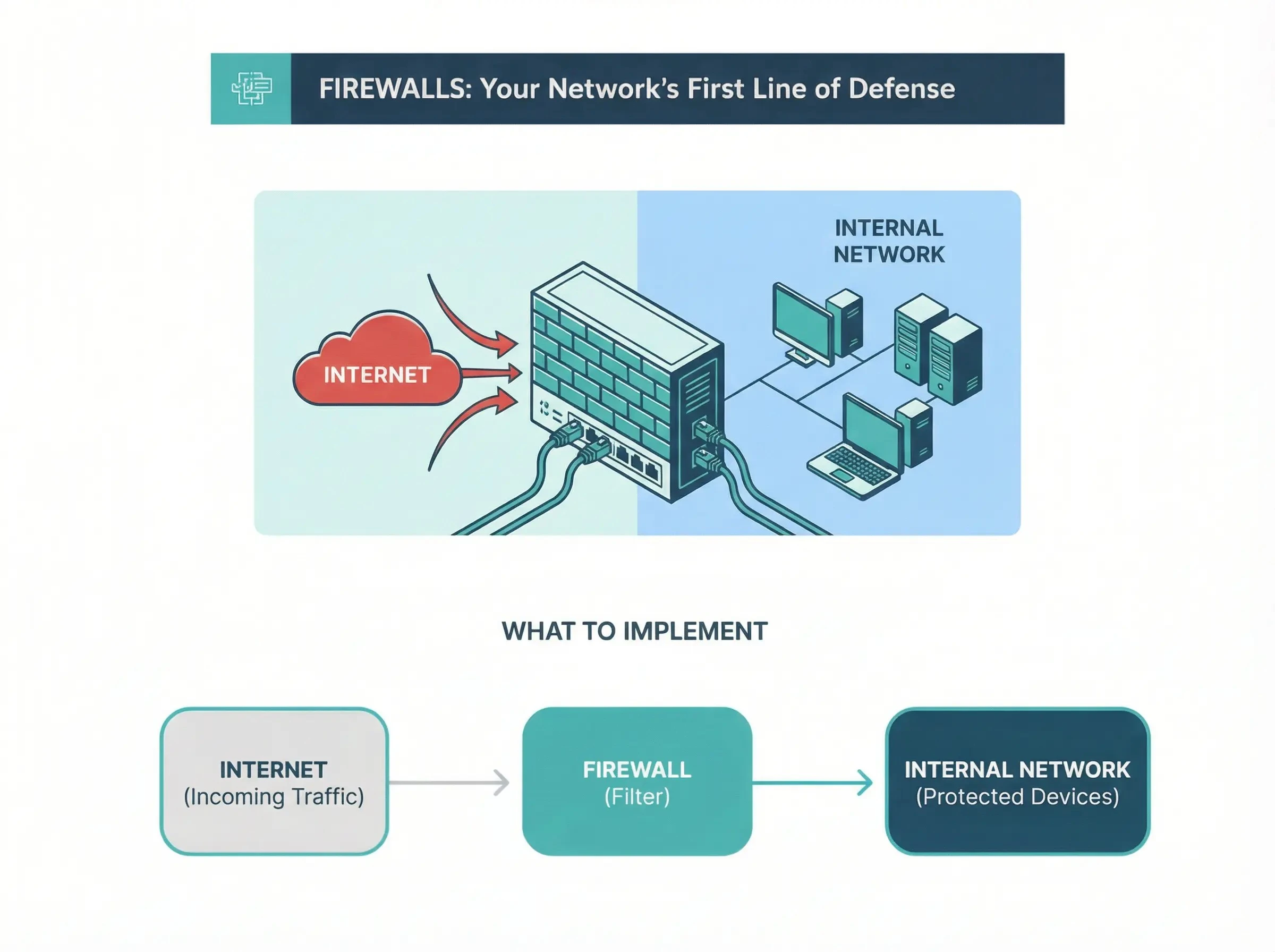
1. Firewalls & Internet Gateways
Like a security guard at your office door, firewalls act as a barrier between your company network and the internet, controlling what data goes in and out to prevent unauthorised access.
2. Secure Configuration
This involves setting up your devices and software securely from the start, removing unnecessary features that could be exploited think stripping away extras on a new car to make it safer.
What to Implement
| Level | What to do |
|---|---|
| Minimum | You should remove apps and accounts that are not using |
| Better | Build standard or up-to-date devices |
| Best | Manage configuration policies |
Microsoft / Windows Examples:
- Disable the guest accounts and change all default passwords.
- Enable bit-locker encryption option on all windows laptops.
Common Mistakes:
- Leave devices with default passwords
- Leave old software still installed and don’t uninstall it.
- Shared logins with others without any fear.
Quick wins:
- Remove accounts and uninstall apps that are not in used.
- Change all default passwords immediately.
- Enable auto-lock on devices after five minutes idle.
3. Access Control
Managing who has access to what within your systems, ensuring people only have the access they need for their job, and particularly controlling powerful administrator accounts.
What to Implement
| Level | What to do |
|---|---|
| Minimum | Use unique user accounts and separate admin account. |
| Better | Enforce strong passwords and multi-factor authentication (MFA). |
| Best | Role-based access control, regular access reviews, privileged access management. |
Microsoft / Windows Examples:
- Separate Microsoft 365 admin account not used for email
- Ensure “Global Admin” roles in Microsoft365 are limited to 2-3 people max.
Common Mistakes:
- Shared login credentials with staff members.
- Use admin account for daily work like email and browsing.
- Do not enable MFA cloud services.
- Employees are granted “temporary” administrative rights that eventually become permanent.
Quick wins:
- Enable multi-factor authentication on your devices to keep your data and account save.
- Create different admin accounts for IT tasks.
- When staff member leaves, immediately disable account.
4. Malware Protection
Protecting against malicious software like viruses, ransomware, and spyware through anti-malware software and safe browsing practices.
What to Implement
| Level | What to do |
|---|---|
| Minimum | Install and update antivirus on all devices. |
| Better | Enable real-time scanning and web protection. |
| Best | Layer with email filters and user training. |
Microsoft / Windows Examples:
- In Microsoft 365, Use defender for endpoint and cloud-based third party detection.
- On Windows, enable Microsoft Defender Antivirus: Settings > Update & Security > Windows Security > Virus & threat protection.
Common Mistakes:
- Relying on free tools without any updates.
- Clicking on any malicious email or link without any investigation.
- Disabled or expired antivirus software use
- Not scanning external devices like USB before use.
Quick wins:
- Enable windows defender for Endpoint and Cloud-based detection.
- Enable Safe Attachments and Safe Links in Microsoft 365 if available.
- Training staff not to open any suspicious links without investigation and put email filtering checks.
5. Security Update Management
Regularly apply updates to fix vulnerabilities in software, preventing attackers from exploiting known weaknesses like patching holes in a roof before rain.
What to Implement
| Level | What to do |
|---|---|
| Minimum | Enable auto-updates for OS and key apps |
| Better | Monthly patch checks |
| Best | Use management tools for fleet-wide updates |
Microsoft / Windows Examples:
- In Microsoft 365, use Intune for centralised updates.
- On Windows, enable automatic updates: Settings > Update & Security > Windows Update.
Common Mistakes:
- Delay in updating due to fear of disruption and ignore update notifications.
- Forgetting third-party apps like browsers.
- Disabling automatic updates due to past bad experiences.
Quick wins:
- Set Windows Update to automatic for security updates.
- Install patch management for browsers (Chrome, Edge auto-update).
- Remove patches that do not support the software.
Evidence & Preparation Checklist
30-Day Cyber Essentials Plan
How to Avoid Failing the Assessment (Top 10 Reasons)
- Admin accounts that are shared
- Mostly missing multi-factor authentication (MFA)
- Admin rights misuse
- Outdated Windows versions
- Antivirus software that has been disabled
- Weak passwords
- An incomplete list of devices
- Poor quality documentation
- Use default passwords
- No disk encryption
FAQs
Cyber Essentials specifies the necessary minimum security controls. ISO 27001 specifies the entire security management system that should remain in place for the management of an organisation's security.
It might not be a requirement, but it can lower insurance premiums and demonstrate the proper level of care.
One year. You need to renew your certification every year.
Screenshots, logs and company policies. All of these items will be required when you submit your Cyber Essentials Certification Application.
Backups are not specifically included in the Cyber Essentials application, but the use of Backups is highly recommended for all businesses.
Cyber Essentials should ideally be a component of a comprehensive strategy to support IT health.
A thorough IT health assessment will typically take into consideration:
- Device
- Account
- Security settings
- Patch Status
- Backup status
When your Cyber Essentials controls are reviewed in this manner, you are ensuring that they will provide the required level of protection in addition to being compliant with the Cyber Essentials scheme.
About This Guide
Computer Support Centre has produced this guide to provide UK small businesses with a straightforward, realistic and practical understanding of Cyber Essentials.
Our approach to Cyber Security is built on four core principles: Simplicity, Consistency, Long-Term Resilience. We believe that small businesses should not be required to have extensive technical knowledge in order to meet recognised security standards or to protect their data and systems.
The Computer Support Centre works collaboratively with organisations to:
- Strengthen Everyday Security Practices
- Align IT Systems with Recognised UK Standards
- Reduce Risk through a Combination of Simplicity and Consistency
- Build Confidence Through Education and Support to Cyber Preparedness
This guide represents the same structured, practical approach used by the Computer Support Centre when assisting businesses in Cyber Essentials and the overall health of their IT systems.
Conclusion
The Cyber Essentials initiative helps small and medium-sized enterprises in the UK protect themselves against the most likely forms of cyber attack by providing a basic baseline of security controls/techniques for achieving that protection.
As client and supply chain expectations continue to rise for applicants looking for funding and support on cybersecurity, Cyber Essentials is no longer something that can be taken lightly by the organisation. Cyber Essentials is almost a must-have for organisations wishing to benefit from an improved level of protection from cyber attacks.
When Cyber Essentials is adopted properly, organisations should view it not as a one-time certification but rather as part of an overall commitment to ongoing improvement in their cyber protection systems, access control policies and procedures, and the adoption of common sense approaches to securing their systems.
As such, by following the guidance and checklists contained within this publication, small and medium-sized enterprises will be able to prepare for their Cyber Essentials assessments with confidence, minimise the number of days lost to a Cyber Essentials failure, and thereby build a more robust base for long-term cyber resilience.