 Skip to content
Turn Your Vision into Success, Let It Fly with Us
Ensure Your Business Is Secure, Compliant & IT-Ready
Complete IT Checklist For Small Businesses in the UK (2026)
Table of Contents
Executive Summary:
- This guide provides a clear, actionable IT checklist tailored for UK small businesses with 1-50 staff, focus in non-technical owners and directors.
- Give minimum standards top priority in order to safeguard against frequent cyberthreats, adhere to the UK GDPR, and maintain business continuity.
- Differentiate between best practice (advanced resilience), better (enhanced security), and minimum (must-have for basic protection).
- All small businesses in the UK must prioritise cybersecurity, data protection, and IT dependability. To begin protecting your data, adhere to the 3-2-1 backup rule.
- Enterprise-level systems are not necessary, but uniform standards are.
- To promote staff awareness and compliance, implement crucial policies as soon as possible.
- Use the 30-day plan to get started quickly and reduce risks.
How to Use This Checklist:
This guide is designed for owners and directors of UK small businesses (1–50 staff).
How to approach it:
1. In every section, begin with Minimum.
2. Give endpoint security, backups, and identity top priority.
3. Give each item an owner, even if IT is outsourced.
4. Review on a quarterly basis rather than “when something breaks.”
You don’t have to do everything at once.

Section 1: Hardware & Devices
Any IT setup is built on dependable and secure hardware. Devices that are outdated or poorly maintained can slow down work, result in downtime, and pose security risks. Ensuring appropriate procurement, lifecycle management, and disposal safeguards your company, employees, and customer information.
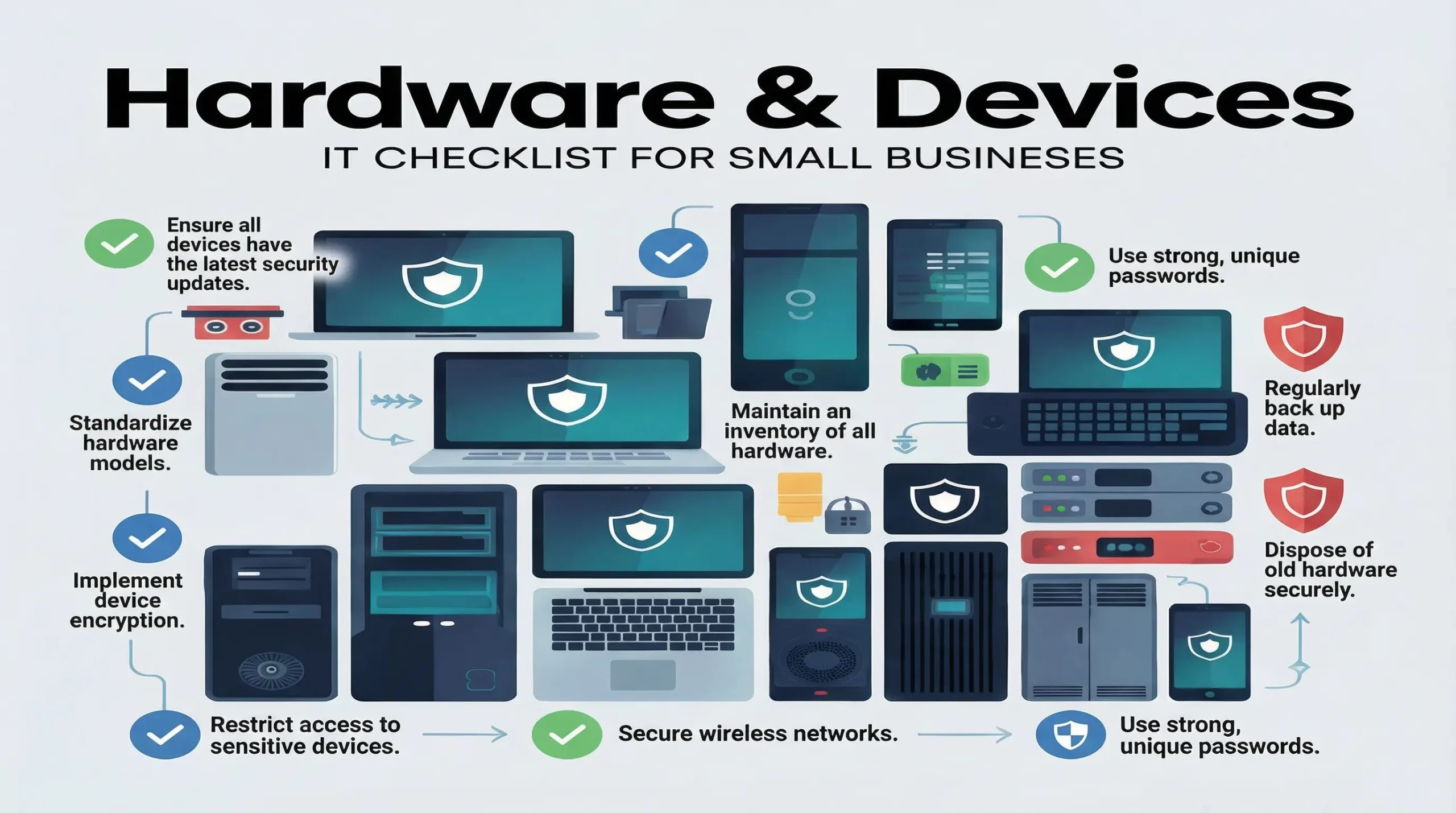
Checklist Table:
| Item | Minimum | Better | Best Practice | Owner | Frequency | Notes |
|---|---|---|---|---|---|---|
| Device standards | Any working PCs / laptops | Standard models | Approved device list | Director / IT | Annual | Avoid “anything goes” |
| Device age | Use until broken | 4–5 year lifecycle | 3–4 year refresh | IT | Annual | Windows 11 ready |
| Business devices | Mix of personal | Mostly company owned | Fully company owned | Director | Ongoing | Reduce risk |
| Assets register | None | Basic list | Full lifecycle tracking | IT | Quarterly | Include serials |
| Printers & peripherals | Functional, basic security | Networked printers with access control | Secure printers with encrypted connections, audit logs | IT / Office admin | Quarterly | Remove default passwords |
Common Pitfalls:
- Many small businesses do not maintain adequate backup of their systems.
- People relay on free and outdated antivirus.
- Frequently purchasing the cheapest hardware repeatedly.
- Printers and peripherals use with default passwords and don’t update and maintain the system properly.
Quick Wins:
- Create a list of every device today and replace any Windows 10-only machines.
- Protect all devices by enable password or PIN.
- Create a simple procurement checklist for future buys.
- Prepare a budget for rolling replacements.
Section 2: Network & Wi-Fi
All of your company’s data is essentially accessible through your network. Small businesses can be extremely vulnerable to attacks if they are not properly configured, particularly when it comes to unprotected Wi-Fi that employees or clients may use. Unauthorised access, malware infections, and even data breaches could result from improperly configured Wi-Fi. You can protect your employees, clients, and sensitive data with segmented networks and strong security settings.
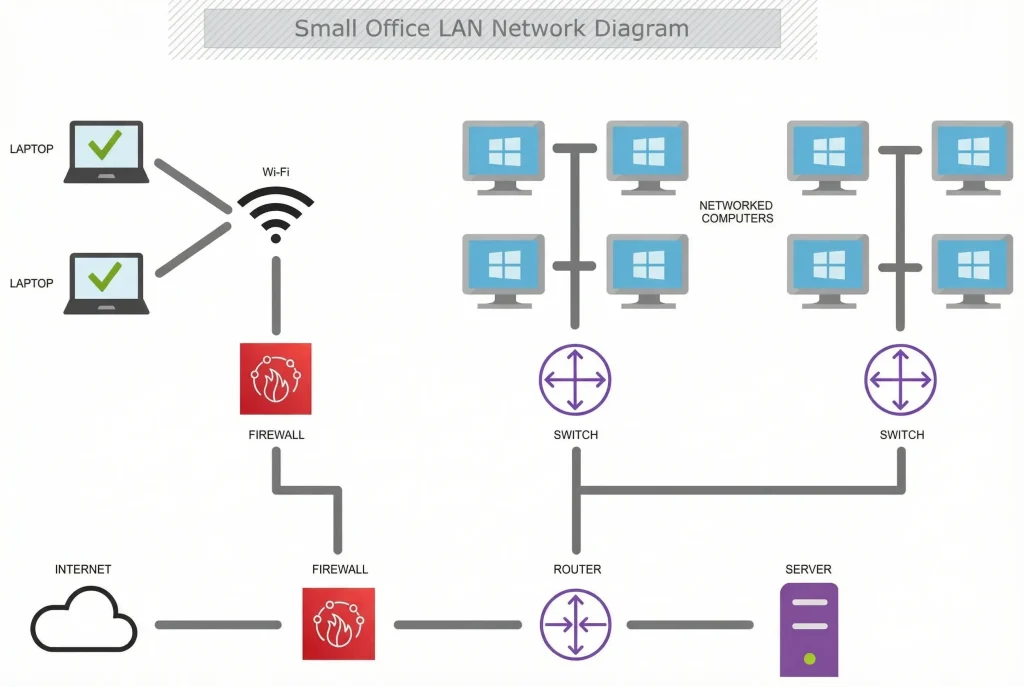
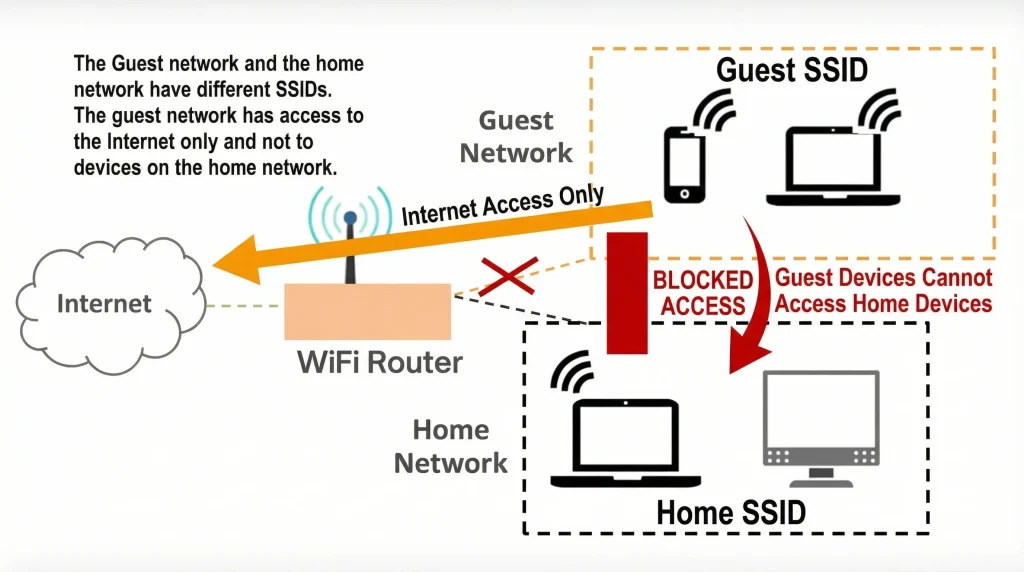
Checklist Table:
| Item | Minimum | Better | Best Practice | Owner | Frequency | Notes |
|---|---|---|---|---|---|---|
| Router / firewall | ISP router | Business firewall | Managed firewall | IT | Annual | Logs enabled |
| Wi-Fi security | WPA2 encryption | WPA3 | Segmented SSIDs | IT | Annual | No shared passwords |
| Guest Wi-Fi | Same as staff | Separate network | Fully isolated | IT | Ongoing | Critical |
| Network changes | Ad hoc | Documented | Change control | IT | Ongoing | Even small changes |
Common Pitfalls:
- Mostly use router with default password and old WPA 2 encryption.
- Keeping staff and guests on same Wi-Fi.
- No firewall logs.
- “Set and forget” networking.
- There is no physical security for routers and switches.
Quick Wins :
- Change the admin password and enable WPA3 today.
- Ensure separate Wi-Fi for guests and staff.
- Update router firmware
- If the router admin is not being used disable it, and disable WPS and UPnP feature.
- Try to ensure physical security for router and switches.
Section 3: Identity & Access Management
Instead of hacked servers, the majority of cyber incidents in small UK businesses begin with compromised user accounts. There is a serious risk to client information, finances, and systems if someone who shouldn’t have access can log in or if staff members have more access than is necessary. One of the most economical and effective ways to safeguard what matters is to implement robust identity and access controls.
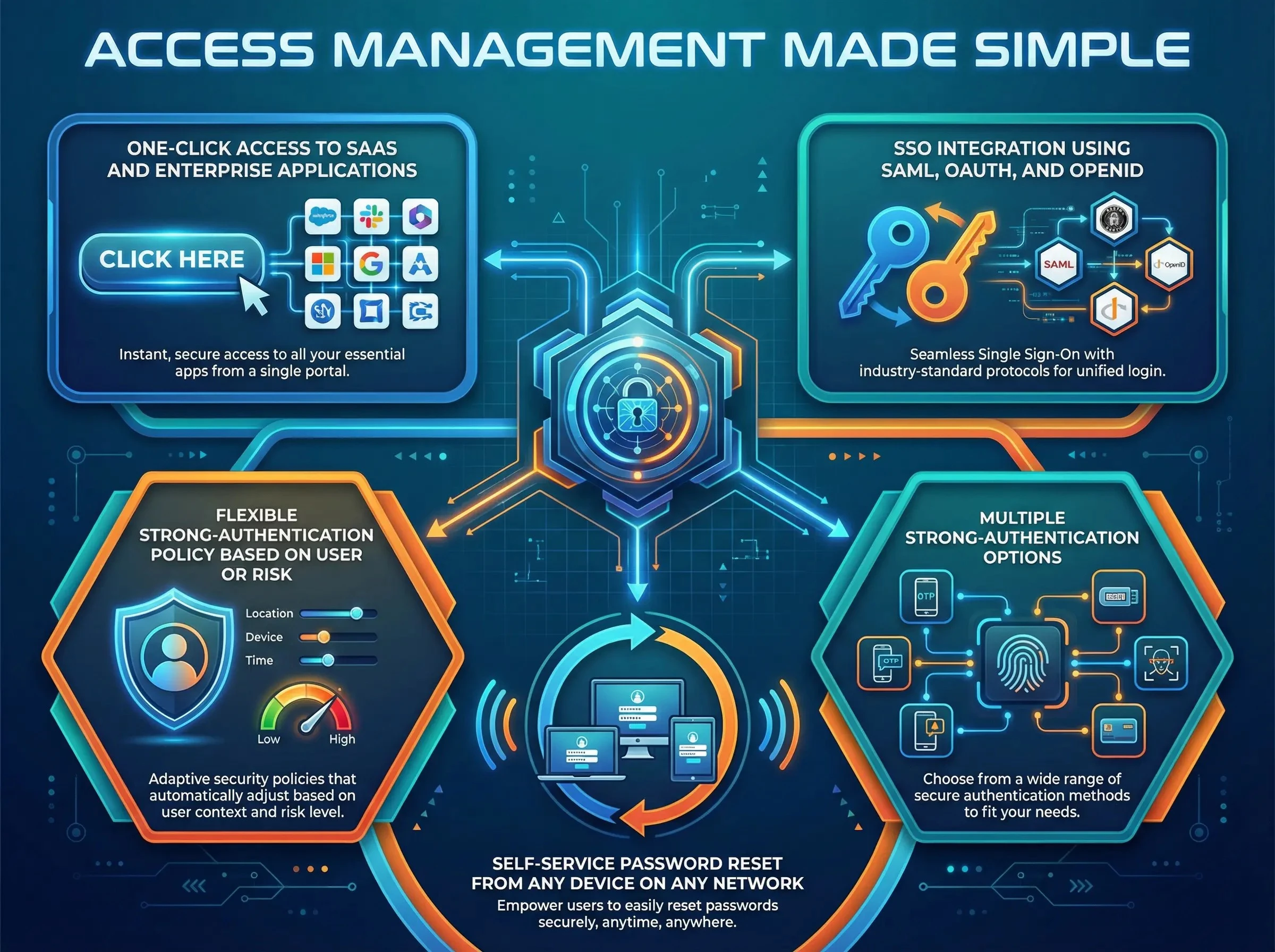
Checklist Table:
| Item | Minimum | Better | Best Practice | Owner | Frequency | Notes |
|---|---|---|---|---|---|---|
| User accounts | Shared logins | Individual user accounts | Role-based access control | IT / Owner | Ongoing | No account sharing |
| Password policy | Strong passwords required | Password manager encouraged | Password manager enforced | IT / Owner | Annual review | Avoid password reuse |
| Multi-factor authentication (MFA) | Email or SMS only | Key systems | All systems | IT | Ongoing | Non-negotiable |
| Leavers process | Manual | Checklist | Automated | HR / IT | Per leaver | High risk area |
Common Pitfalls:
- Shared your login credentials for business and email.
- Implement MFA only for admins and do not enable it for other employees.
- Leaving the account open and active once it has been used.
- Employees are granted “temporary” administrative rights that eventually become permanent.
- Using the same password everywhere and documenting and enforcing password rules.
Quick Wins:
- Enable MFA everywhere if possible. And remove the shared account and give each staff member their own login.
- When staff member leaves, immediately disable their active account.
- Use a password manager instead of spreadsheets or notebooks.
Section 4: Email & Collaboration
Phishing, fraud, and ransomware attacks most frequently target email. Additionally, contracts, invoices, and personal data are frequently included in collaboration tools. In addition to protecting your company’s reputation, a secure email and document setup helps reduce fraud risks and guarantees that you remain in compliance with UK GDPR regulations.
Checklist Table:
| Item | Minimum | Better | Best Practice | Owner | Frequency | Notes |
|---|---|---|---|---|---|---|
| Email platform | Free email services | Microsoft 365 / Google Workspace | Business Premium plans | IT | Ongoing | Avoid free email |
| Spam filtering | Default filtering | Advanced filtering | AI anti-phishing | IT | Ongoing | Stops most attacks |
| Email encryption | Manual encryption | Policy-based encryption | Automatic encryption | IT | Ongoing | For sensitive data |
| File sharing | Email attachments | Cloud sharing links | DLP-controlled sharing | IT | Ongoing | Version control |
Common Pitfalls:
- Using a personal email for work related purposes.
- Opening suspicious link or email without checking.
- There is no defence against email spoofing or impersonation.
- No security instructions for users.
Quick Wins:
- If you’re using free email, you should switch between business and personal email to avoid phishing attacks.
- Add email signatures alerting you to external emails and block dangerous attachments.
- Prepare your staff for red flags.
- Conduct a phishing simulation using free tools.
- Set expiration dates on file-sharing links and use shared mailboxes appropriately.
Section 5: Endpoint Security
The majority of attacks are successful on endpoints, which include laptops, desktop computers, and
mobile devices. Data theft, ransomware, and phishing malware typically begin on a single device.
Endpoint security lowers the risk of data breaches, business interruption, and legal problems under
UK GDPR.
Checklist Table:
| Item | Minimum | Better | Best Practice | Owner | Frequency | Notes |
|---|---|---|---|---|---|---|
| Antivirus | Reputable antivirus installed | Business-grade antivirus | EDR / XDR with behaviour-based detection | IT | Ongoing | Avoid free consumer AV |
| Patching | Manual updates | Automatic OS updates | OS and application patching | IT | Monthly | Critical |
| Disk encryption | Enabled on laptops | Laptops only | All devices encrypted | IT | Ongoing | BitLocker / FileVault |
| USB control | Open | Limited access | Restricted or blocked | IT | Ongoing | Prevent data loss |
Common Pitfalls:
- Relaying solely on free or outdated antivirus software or built-in antivirus software.
- Employees using administrative privileges for daily tasks.
- Ignoring the patches because can break something.
- Laptops used outside of the office are not encrypted.
- Allow the USB sticks without any restrictions.
Quick Wins:
- Make the system secure by turning on full disc encryption for all laptops today.
- Turn on automatic updates for the operating system and applications.
- Take away standard users’ local admin privileges.
- Use a business-grade solution in place of consumer AV.
- If at all possible, block unidentified USB devices.
Section 6: Data & Backups
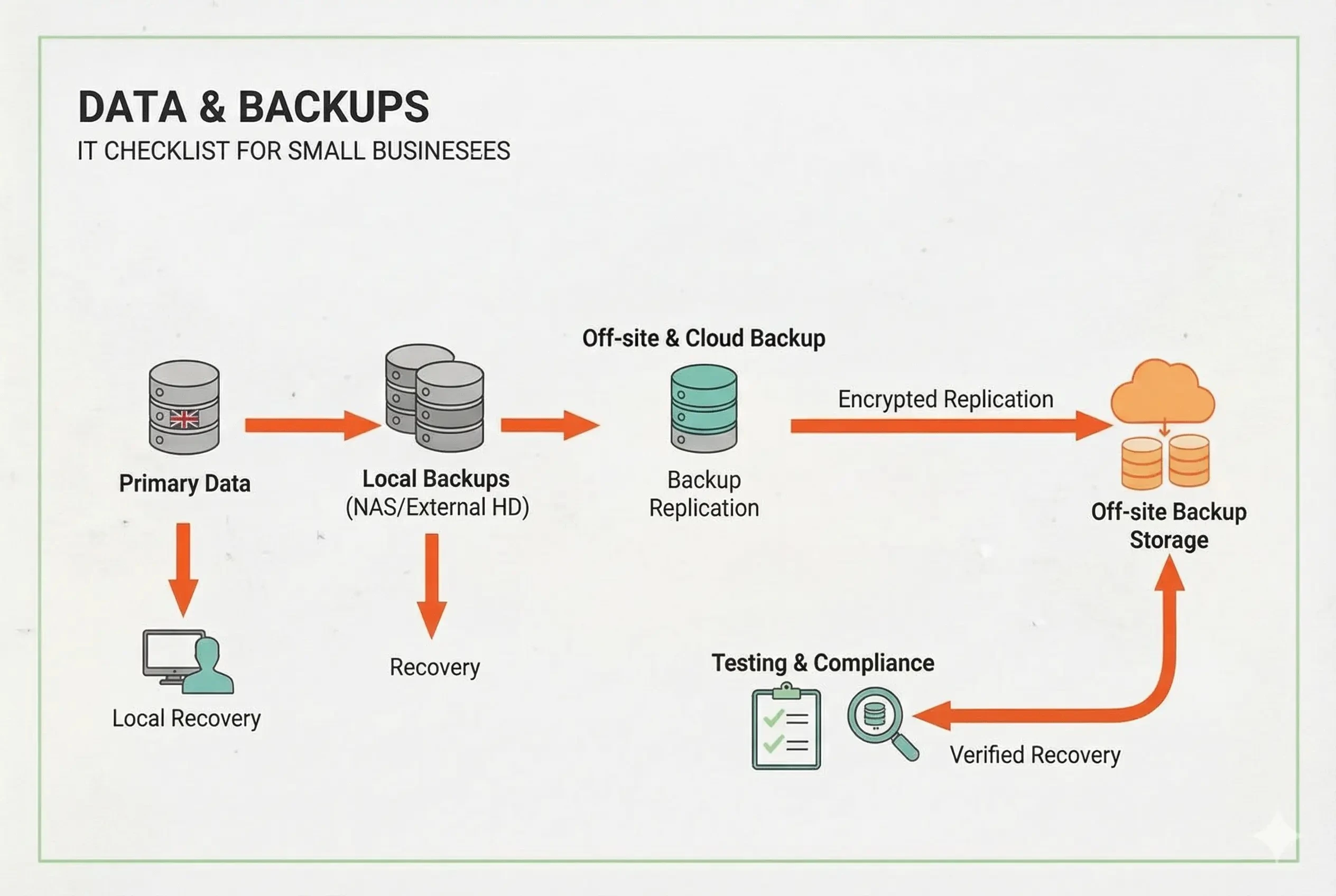
You cannot operate a profitable business if you are unable to secure your data. A small business’s most valuable asset is frequently its data. Years of work can be destroyed by human error, ransomware, hardware failure, or accidental deletion. To comply with UK GDPR requirements, recovery, resilience, and appropriate backups regarding data availability are crucial.
Checklist Table:
| Item | Minimum | Better | Best Practice | Owner | Frequency | Notes |
|---|---|---|---|---|---|---|
| Backup coverage | Key folders only | All systems and cloud data | Full environment | IT / Owner | Daily | Include SaaS |
| Backup rule | Single copy | 3-2-1 rule adopted | Immutable backups | IT / External IT | Daily | Ransomware-safe |
| Restore testing | Never tested | Annual testing | Quarterly testing | IT / Owner | Quarterly | Most fail here |
| Backup monitoring | None | Alerts enabled | Fully managed monitoring | IT | Ongoing | Silent failures |
Common Pitfalls:
- Believing that full backups are automatically provided by cloud services.
- Backups kept on devices that are always linked to the network.
- You should never verify that backups can be restored.
- Data backups, but not system configurations.
Quick Wins:
- Verify what data is currently backed up and how (email, cloud files, laptop).
- Implement the 3-2-1 backup rule immediately.
- Schedule a test restore this month.
- Encrypt all backup storage locations and assign responsibility to a few trusted individuals.
- Limit access to the backup system to a very few people, and only give it to people who are trusted.
Section 7: Remote Work & Mobile
For small businesses in the UK, working remotely and in a hybrid environment has become commonplace, but improper management can significantly increase risk. Sensitive information may be exposed by personal devices, public Wi-Fi, and home networks. While promoting flexible working, clear guidelines, secure access, and fundamental controls lower the risk of breaches.
Checklist Table:
| Item | Minimum | Better | Best Practice | Owner | Frequency | Notes |
|---|---|---|---|---|---|---|
| Remote access | RDP | VPN for remote users | Enforce VPN + MFA | IT/Owner | Quarterly test | Required for secure home working |
| BYOD | Allowed | Restricted | Managed | Director | Annual | Clean policy |
| Mobile devices | Unmanaged | Basic MDM | Full MDM | IT | Ongoing | Wipe capability |
| Home Wi-Fi | Assumed safe | Guidance | Security checks | IT | Annual | Staff education |
Common Pitfalls:
- Most people use personal computers for work.
- Personal devices with company data that are not encrypted.
- Allowing workers to work remotely without formal guidelines.
- Thinking that cloud tools automatically make remote work safe.
Quick Wins:
- Make all remote access require the use of a VPN.
- Turn on screen lock and encryption on all mobile devices.
- Stop sending emails with private documents attached.
- Take a look at the cloud apps that staff members can use remotely.
Section 8: Data Protection & Compliance (UK)
Most UK small businesses process personal data staff details, customer records, invoices, or emails. Under UK GDPR and ICO guidance, organisations must protect personal data, control access, and respond properly to requests and incidents. Compliance is about good data handling, not paperwork alone.
Checklist Table:
| Item | Minimum | Better | Best Practice | Owner | Frequency | Notes |
|---|---|---|---|---|---|---|
| Data inventory | Informal | Documented | Reviewed regularly | Director | Annual | What data you hold |
| Cyber Essentials | Not considered | Aligned controls | Certified Cyber Essentials | Director | Annual | Often required by clients |
| Lawful basis | Assumed | Documented per process | Review and validated | Director | Annual | Required under UK GDPR |
Common Pitfalls:
- The location of personal data storage is unknown..
- Keeping data “just in case” without adhering to data retention regulations
- Assume that small businesses do not need to implement UK GDPR (General Data Protection Regulation) controls.
- Using vendors without checking their data security pledges.
- Ignoring special category data rules
Quick Wins:
- Write a simple, one-page data retention policy.
- Put a privacy statement at the bottom of emails and webpages.
- Create a basic checklist for answering requests for access to data subjects.
- Align critical controls with Cyber Essentials requirements.
- Assign one person to manage data security responsibilities.
Section 9: Business Continuity & Incident Response
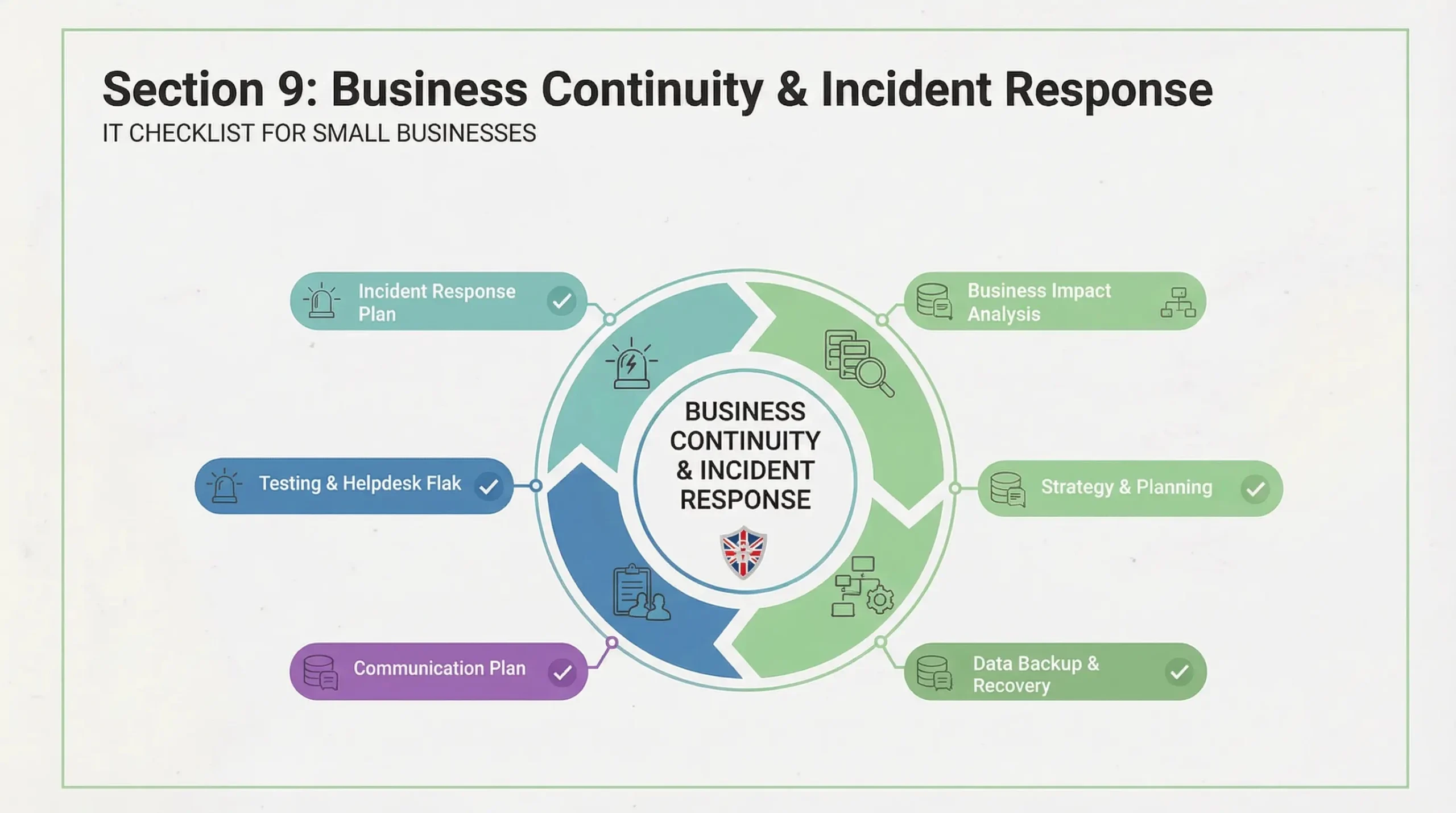
A small business may cease operations overnight due to supplier problems, power outages, cyberattacks, or IT malfunctions. When something goes wrong, business continuity planning guarantees that you can continue trading or quickly recover. Incident response helps you meet insurer and ICO (Information Commissioner’s Office) requirements while minimising damage and
downtime.
Checklist Table:
| Item | Minimum | Better | Best Practice | Owner | Frequency | Notes |
|---|---|---|---|---|---|---|
| RTO/RPO | Undefined | Basic target | Test targets | Owner | Annual | Plain English |
| Incident plan | None | Written | Practised | Owner / IT | Annual | Who does what |
| Supplier failures | Assumed OK | Known risks | Alternatives | Owner / IT | Annual | Single points |
| Staff awareness | None | Basic briefing | Tabletop exercise | Owner / IT | Annual | Calm response |
Common Pitfalls:
- “We’ll figure it out”
- we cannot perform testing plan before a real incident occurs.
- There are no established procedures for managing cyber incidents.
- It’s unclear which systems are most important and how.
Quick Wins:
- List the top three systems that are essential to your business right now.
- Make a basic “what to do first” incident checklist.
- Keep emergency contacts offline (on personal phones or in print).
- Decide on acceptable downtime for important systems.
- Conduct a brief tabletop exercise with management.
Section 10: IT Support & Governance
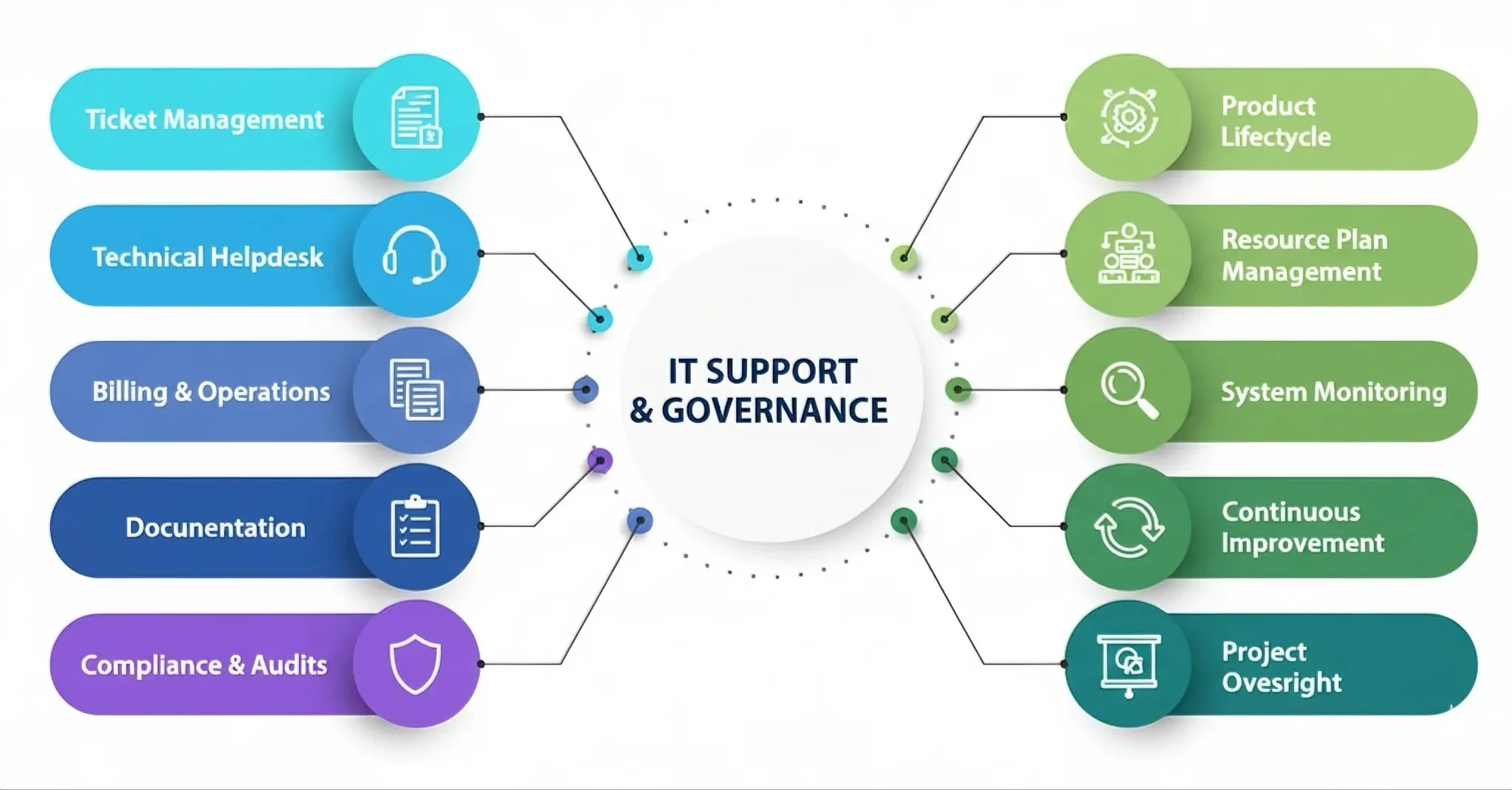
Good IT involves ownership, documentation, and continuous supervision in addition to technology. As your company expands, clear governance guarantees that systems remain dependable, safe, and compliant. Without it, problems develop covertly until they become costly issues.
Checklist Table:
| Item | Minimum | Better | Best Practice | Owner | Frequency | Notes |
|---|---|---|---|---|---|---|
| IT ownership | Unclear | Named person | Governance role | Owner | Ongoing | Even if outsourced |
| Documentation | None | Basic | Central knowledge base | IT | Quarterly | Reduced risk |
| Monitoring | None | Alert | 24/7 monitoring | IT | Ongoing | Prevent issues |
| Supplier review | Never | Annual | KPI-driven | Owner | Annual | Value for money |
Common Pitfalls:
- When it comes to IT decisions, nobody is clearly in charge.
- Completely depending on an outside supplier without supervision.
- There is no system, password, or supplier documentation.
- IT support that is reactive rather than proactive.
- One-time policies that are never updated.
Quick Wins:
- Designate one individual to be in charge of IT governance.
- Make a basic folder for IT documents (systems, suppliers, access).
- Enumerate all IT providers along with the terms of their contracts and the dates of their renewals.
- Configure basic internet and essential service monitoring.
- Schedule an annual IT review date in the business calendar.
Cyber Essentials (UK)
What Small Businesses Actually Need to Know
Cyber Essentials is a UK government-backed cyber security scheme designed to help organisation to protect from cyber attacks. Many UK clients, insurers, and public-sector contracts now expect or require Cyber Essentials certification even from small businesses.
It matters:
- If you Work with the councils, NHS, or larger firms
- Want reassurance for customers
- If you need a baseline security framework
It focuses on:
- Firewalls
- Secure configuration
- Access control
- Malware protection
- Patch management
Essential IT Policies (Minimum Set) :
- Acceptable Use Policy
- Password & MFA Policy
- Backup Policy
- Incident Response Policy
- BYOD / Remote Working Policy
FAQ:
A solid base configuration is the following: Microsoft 365 Business, with MFA enabled, Auto Update on, 3-2-1 back up, and Cyber Essentials certification. Start with minimum standards in this checklist.
Expect £40–£150 per user per month for managed support, or £60–£150/hour for ad-hoc. Prices are dependent on size and requirements; full management is predictable and proactive.
It's not compulsory for most, but is strongly advised by NCSC for basic protection. Required for a lot of government / supply chain contracts and increases trust.
Do the 3-2-1: 3 copies, 2 different media, 1 off-site/cloud). Include critical files, emails and systems; test regularly.
30-Day Implementation Plan
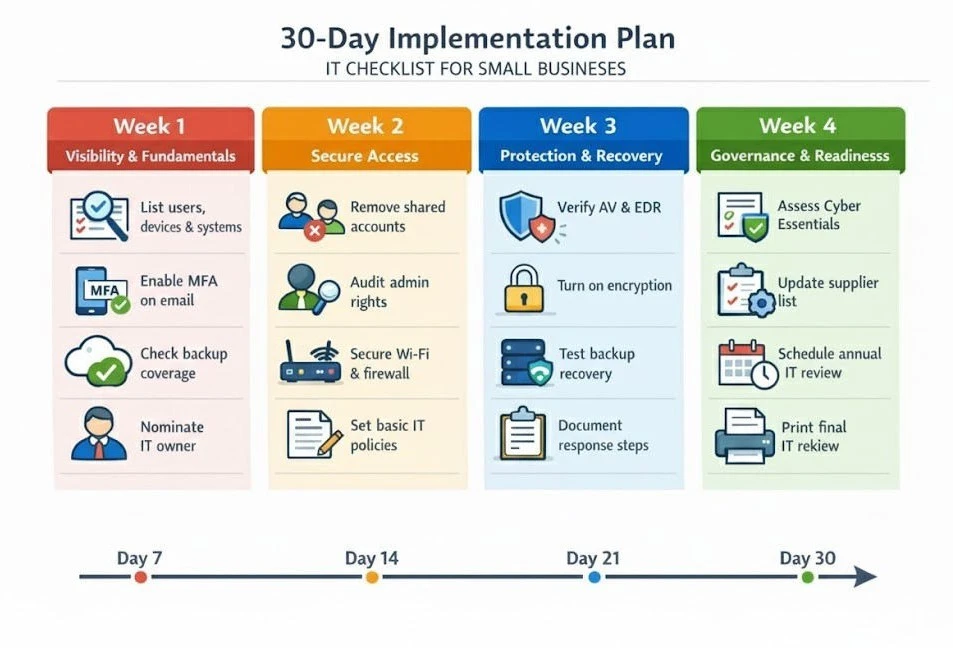
Printable Master IT Checklist:
Soft CTA
If you want a professional IT health check against this checklist then have your device list, user list and current policies ready. A review is generally focused on identifying gaps in security, Cyber Essentials preparedness, backup resilience and compliance alignment.
You now have:
- An authoritative, UK-focused guide from start to finish
- Cyber Essentials Demystified Keystar Training
- Practical checklists, tables and action plans
- Referable, trustworthy, SEO strong content.
About This Guide:
This comprehensive checklist guide has been developed by Computer Support Centre, with the aim of providing clear, practical, and easy-to-follow IT guidance for small businesses and professional services.
The recommendations in this guide are written with real-world experience, UK compliance requirements, and everyday business operations in mind.
Our focus is not just on tools and technology, but on processes, security habits, and long-term IT stability, so that businesses can protect their data, minimise downtime, and grow with confidence.
Conclusion:
Building a Secure, Reliable IT Foundation for UK Small Businesses
By 2026, IT will be more than just a support function for small businesses in the UK; it will be an essential part of the business against risk and contentiousness. Because of cyber threats, data protection regulations, and the realities of remote work, even businesses with fewer than 50 employees must adopt consistent, minimum IT standards.
This checklist is designed to guide directors and owners of small businesses so that they can run a successful and secure business and easily resolve business problems. Excessive spending, enterprise-grade systems, and sizable IT teams are not required. You do need clarity, ownership, and consistency.
By adhering to this guide:
• Limit your exposure to typical online threats.
• You meet the requirements of Cyber Essentials and the UK GDPR.
• You become more resilient to data loss, outages, and ransomware.
• You create a repeatable and reviewable IT baseline.
Getting started is more important than achieving success. You must start with the bare minimum, delegate accountability, and conduct quarterly reviews. Small upgrades add up over time to create robust, reliable IT that promotes growth rather than impedes it.
By itself, this checklist will eliminate and reduce gaps that many businesses and organisations were unaware of. Whether IT is managed both internally or externally, using a structured framework like this ensures better supplier conversations, fewer surprises, and well-informed decisions.