 Skip to content
How Often Should UK Businesses Replace Computers?
Table of Contents
Why computer lifecycle planning matters
- Just like your company cars are vital for getting your work done every day, when you will not get that from your computer and no longer work then you have big problems. When your computer does not work, it will cost you hours of lost time due to not being productive, being very frustrated and also running the risk of your company’s data being compromised due to not having the up-to-date security updates.
- For small and medium-sized companies in the UK, by planning when to replace your computers you will:
- Prevent sudden computer breakdowns in busy times when you need them most
- Reduce the amount of time your team spends on very inefficient computers, costing your business hours of lost productivity every week
- Keep your data secure as you will have up-to-date security patches on your systems which will reduce your overall risk of data breaches
- Have an expense budget instead of an emergency replacement budget
- Comply with the UK GDPR by having technically sound systems with equal-to-or-greater-than what UK GDPR specifies as “appropriate technical protection measures”.
- A very common situation is that SMEs are replacing their computers when they break; thus, they will typically incur additional costs, experience additional downtime and create major risks to their business.
- If you consistently prepare to replace your computers every 3-5 years, you will offer your business greater value than if waiting for your computers to break. This guide provides you with helpful information regarding your computer lifecycle, warning signs, risk assessment, solutions to budgeting, and checklists helping you make reasonable and low-stress decisions.
Typical lifespan of business computers
In general, business-based computers usually have shorter lives than consumer-based laptops due to their increased level of software that they support, the duration that they are typically used for, and their higher number of security risks associated with them.
Advising UK’s small to medium-sized enterprises (SMEs) on the general life expectancy of business-based machines is helpful (is always how the average machine has lived).
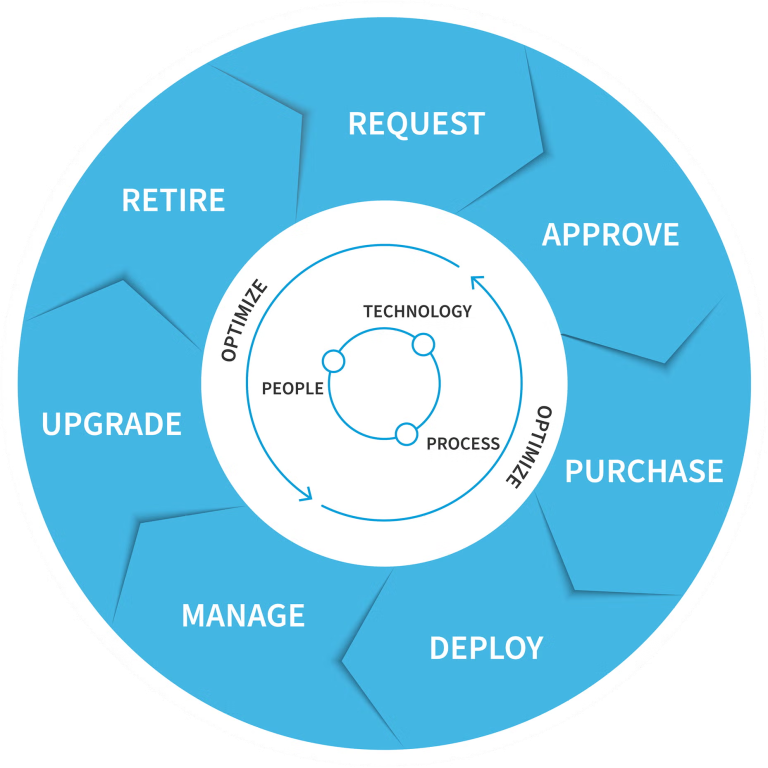
Office desktops: 4 to 5 years
- Commonly have the following business uses; email, spreadsheets, web browsing and light accounting.
- Reason: Windows 11 will stop being supported around 2031, and after 5 years, it is difficult for any hardware to withstand upgrades.
Business laptops: 3 to 4 years
- Commonly have the following business uses; video calls, editing documents on the go.
- Reason: After 3 to 4 years, the battery has deteriorated, the hinges are worn out and the performance will start to deteriorate noticeably.
High-performance workstations (design, accounting with large databases):3 to 5 years
- Commonly support the following uses; heavy software (CAD, large Excel files, video editing).
- Reason: Demanding workloads mean that hardware gets used up quicker than other business-based PCs.
Servers (on-premise): 4 to 6 years
- These commonly have the following business uses; file storage, email servers and hosting internal business applications.
- Reason: Although enterprise-grade hardware will last longer than consumer-grade hardware, power supplies and hard disk drives (HDDs) will fail between 4-6 years.
- On average, however, the actual life expectancy will vary based upon computer usage levels/maintenance and the environmental conditions in which the computers are operating (i.e. dusty warehouses will shorten the life expectancy of a computer).
Signs that a computer needs replacing
- When you notice any combination of these symptoms occurring too often, you should consider replacing your computer:
- Your computer has started to slow down to the point where it affects productiviYoty, such as programs taking a long time to load or when there is a long lag when using multiple programs at once.
- Your computer crashes frequently or your hardware has problems, such as blue screens or random restarts or overheating.
- Your computer cannot run more recent versions of software (e.g., Newer Versions Of Windows/Office/Quickbooks will not install on or run as expected).
- You are nearing the end of support (Windows 10 will no longer be supported as of October 2025. THIS MEANS NO MORE SECURITY PATCHES FOR WINDOWS 10).
- Your laptop has battery issues; e.g., its battery lasts less than 2 hours on a full charge or will not fully recharge.
- Your hard drive storage limitations are causing persistent "low hard drive space" notifications even after you have cleaned up the hard drive.
- The cost of repairing your computer is approaching the cost of replacing it, i.e., £200-£300 to repair a 5-year-old computer typically is not worth it.
- The most compelling signal that it is time to replace your computer is if people on your team are constantly complaining about speed or reliability.
Risks of keeping computers too long
- Vulnerability to Security Risks: If you're still running Windows 10 after 2025, these computers will not be patched by Microsoft, making them appealing targets to Ransomware/Phishing attacks.
- Decreased Worker Productivity: Employees spend 30-60 minutes of their workday waiting for a computer to respond (approx. £5,000-15,000/year for 10 employees).
- Increased Tech Support Costs: As more computers start breaking down, the number of times support personnel are called out (Costing approx. £75-150 per trip) will rise.
- Hardware Failure: A computer can die without notice and at the worst possible time (While in busy times).
- Compatibility with Software: The new software that you want to run on the cloud or the New Features of Microsoft 365 will not work.
- Reputational Damage: When customers are frustrated with slow computers, quotes and invoices will be delayed.
Factors that affect hardware lifespan
- Usage: A computer that is used heavily (All Day, Running Multiple Applications) will wear down quicker than a computer that is used lightly (1-3 hours).
- Environment: PCs located in a retail environment (dusty) or hot office environment will have a reduced lifespan due to the harshness of the environment.
- Maintenance: If you clean and maintain all of your devices on a regular basis, you will extend the lifespan of your computer.
- Original Quality of the Device: Business Class Computers (Dell Latitude, HP EliteBook, Lenovo ThinkPad) will outlast a Consumer Grade Computer.
- Software: The Operating System/Office software today is much bigger and heavier than it was 5 years ago.
Break-Fix Services
- Standard Office Desktops: replacement every 4 to 5 years
- Business use Laptops: replacement every 3 to 4 years under daily use conditions
- High performance Workstations: replacement every 3 to 5 years, depending on the types of applications running
- On-Premise Servers: replacement every 5 to 6 years
- Tablets/lightweight devices: replacement every 3 to 4 years
- To minimize the impact of the cost of replacing devices, it is recommended to implement a replacement plan that provides for a phased-out replacement of approximately 20-25% of devices each year.
Upgrade vs replacement decisions
- You should consider upgrading a device under the following criteria:
- The Age of the device is between 2 to 3 years, only one component is causing performance issues (e.g. add RAM or SSD).
- The cost of the upgrade is less than 30% of the replacement value of the device.
- The operating system is still supported.
- You should consider replacing a device under the following criteria:
- The Age of a laptop is older than 4 years, age of desktop is older than 5 years.
- There are multiple performance issues that require replacement.
- The operating system of the device is no longer supported.
- The cost of upgrading to the latest version (>50%) exceeds the replacement cost.
- You have serious doubts about data security and/or your compliance with current legislative requirements.
- General Rule: replace a device if the cost of repairing/upgrading a device that is at least 4 years old exceeds £300.
Budgeting for computer replacement
- Annual Budgeting: Set aside 15-25% of original hardware cost per year (e.g. £800 laptop = £120-£200/year).
- Employee Allowance: £300-£500 for each employee every 4 years (to purchase laptop + basic setup).
- Phased Replacement: 20-33% of devices will be replaced each year to spread cost.
- Leasing: Cost can be spread over 3 to 4 years (many IT providers in the UK want £20-£40 per user per month).
- Tax Relief: Capital allowances or annual investment allowances for any new equipment purchased.
- Quick Win: Create a simple spreadsheet that shows devices purchased, date of purchase, estimated year of replacement, estimated cost to replace.
Computer replacement decision checklist
- Is the age of computer > 4 years (laptops) or > 5 years (desktops)?
- Has the computer frequently slowed down or crashed?
- Is the operating system nearing its end of support?
- Does the laptop battery last less than 2 hours when running on battery?
- Is your hard drive always almost full, even after regular cleanings?
- Is the cost to repair computer more than 30% of the cost to purchase a new computer?
- Do you have any issues with running software adequately on the current computer?
- Are there any security and compliance concerns, e.g. using unsupported operating systems?
- If you can say yes to 3 or more then plan to replace computer this year.
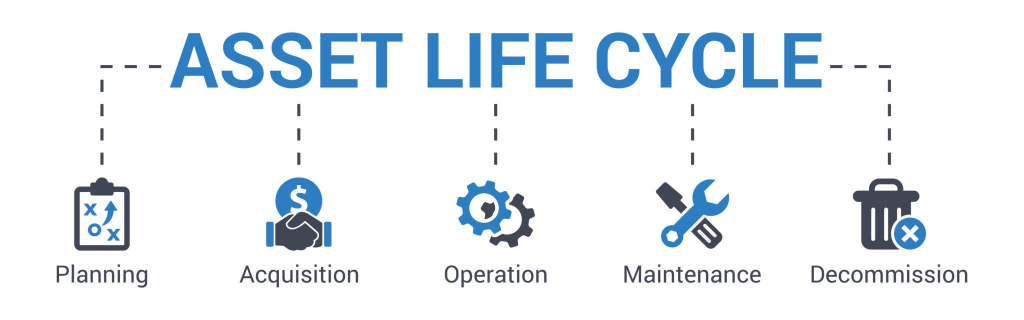
IT hardware lifecycle planning checklist
- List all company-owned devices with purchase date and specifications.
- Set a replacement year for each device (desktops will typically be replaced after 4-5 years, laptops will typically be replaced after 3-4 years).
- Estimate the replacement cost of each device.
- Budget 15-25% of original purchase price per year.
- Establish a phased replacement plan of 20-33% of devices each year.
- Review your list each year and update accordingly.
Business device audit checklist
- All devices included?
- Age and condition recorded?
- OS version and status of support checked?
- Performance issue logged?
- Confirmed security features of device?
- Backup status verified?
FAQs
Office desktops: 4-5 years; Business laptops: 3-4 years; High-performance: 3-5 years. Varies depending on usage, maintenance.
Upgrade if one component fails and the cost is <30% of a new device and replace if having multiple problems or age > 4 years old.
No, it is better to replace computers through a phased replacement (20-33% annually) so there won't be large amounts of money to come up with all at once and no disruption to business.
Only if there are extended security updates (will need to be paid as of 2025 for Windows 10); it is better to replace older devices before the support ends.
Set aside 15-25% annually per device of the original purchase price, lease if a business has cash flow constraints, and phase in over a period of 3 years.
Extend the life to 5-6 years for devices with low usage, concentrate on purchasing laptops and upgrade RAM/SSD to extend usable life of low-usage devices.
Visit the Microsoft website every year; Windows 11 support likely lasts until ~2031; plan on upgrading upon 1-2 years of OS expiration.
For laptops, yes. Generally, the 3-4 year manufacturer warranty will cover the vast majority of device/component failures.
Listen to your employees if you hear productivity-related complaints from them, they usually relate to older computers.
About This Guide
The Computer Support Centre has produced this document to help English SME’s manage their computer equipment throughout its life cycle. There is a lot of uncertainty about when it’s time to upgrade or purchase new computers, this may result in a poor level of performance or create a security risk, as well as incur unexpected costs.
This document will provide the reader with full, clear information as to how long business computers commonly last, when to replace them, and how to effectively manage a hardware upgrade plan. The language throughout is written in such a way that it can be understood by business owners, directors and office managers who simply want to make informed decisions regarding their computer needs without having to be technically knowledgeable.
Conclusion
Business computers are a vital component of running a successful everyday business, using out-of-date computers can have a negative effect on productivity, result in a security hole and cause increased levels of maintenance. By replacing computers at the right time is a way of eliminating these negative impacts and ensuring a consistent manner of operating successfully.
By monitoring the performance of a device as you follow suggested replacement cycles, and by planning for upgrades in advance, SMEs can better manage their IT equipment. Using a proactive approach to replacing hardware supports better reliability, greater productivity of your employees, and an improved level of business performance.