 Skip to content
Turn Your Vision into Success, Let It Fly with Us
Ensure Your Business Is Secure, Compliant & IT-Ready
IT Support Guide for Accountants
Table of Contents
Executive Summary
- IT is relied upon by accountants more than by other small businesses.
- IT issues can cause serious disruptions to accountants, due to their reliance on confidentiality, deadlines, and availability.
- Proactive IT support is more beneficial than reactive support.
- Most IT issues in accounting during tax season are predictable and easily avoidable.
- Accountants’ cybersecurity is about minimising risk, not achieving perfection.
- The UK GDPR focuses on balanced security and accountability that is fair and reasonable.
- Recovering from downtime is usually more expensive than creating systems to prevent downtime, especially during peak periods.
- Evidence, clarity, and responsiveness are visible features of a quality IT support service.
- The same principles apply to both large and small firms, they simply require different levels of controls.
Who this guide is for
- Accountancy firms in the UK include the following:
- Sole practitioners
- Small practice (2-20 employees)
- Medium-sized firms (20-100 employees)
- Partners, directors and practice managers
- Operations, compliance and office managers
- Non-technical decision makers responsible for client data and uptime.
IT Needs of Accountancy Practices
Accountants rely on IT in a way no other type of business does.
If an email system fails to send/receive properly, documents become unavailable for use, or practice software is down, this usually results in work being completely halted. Deadlines will not shift as soon as a system fails.
The following are examples of unique pressures faced by accountants:
- Extremely sensitive financial or personal information
- Obligations for confidentiality (legal and professional)
- Fixed due dates (tax return, payroll, year end accounts)
- Higher risk during peak seasons of activity
- Heavy reliance on cloud computing systems and email
- For accountants, “mostly working” IT systems are not sufficient to allow them to satisfy their clients. Systems must be secure, reliable, and recoverable, especially when there are issues with performance.
What Accountants Should Expect from IT Support
Good IT support for accountants should provide:
- Proactive monitoring of systems, rather than waiting until they fail to fix them.
- Clear accountability and ownership in relation to IT issues.
- Knowledge of how accountant workflows operate and what support will be needed.
- Rapid response during peak times of the year.
- Use of everyday language when providing technical support; avoiding jargon.
- Work with software vendors to address their problems.
- Provide evidence of system controls, backups, and security.
Accountants should not expect:
- Guarantees from IT support that any downtime will not occur.
- A one-size-fits-all set of solutions.
- Security which does not require any input from the end user.
- Compliance without documentation.
Sector-Specific IT Support Checklist for Accountants
- Each section below includes:
- Why it matters for accountants
- What good looks like
- Common mistakes
- Practical tips
1) Security & Confidentiality
Why it matters for Accountants
Accountants deal with financial information that is extremely sensitive, very attractive to criminals, and very likely to be stolen. Cybercriminals use phishing and email compromise to attack an accounting firms daily.
What Good Looks Like
- Maintain strong access control and provide a unique login for each employee
- Use multi-factor authentication for both your email and cloud services
- Separate users from administrators by providing different levels of access
- Educate employees on the hazards of phishing
Common pitfalls
- Using shared login credentials with other staff members
- Providing employees with excessive access to client data
- Believing that using antivirus software alone provides adequate protection
- Believing that cyber security is strictly an IT issue
Practical Tips
- Make email security your top priority.
- Review access rights every three months to ensure compliance.
- Assume that your employees will make mistakes and include controls in your design to help mitigate errors.
2) Email & Document Management
Why it matters for Accountants
The management of email and documents is essential to effective communication and record keeping with clients. If these two components of an accounting practice are not well-managed, accountants will be putting their clients’ information at risk and exposing themselves to compliance issues while at the same time having a negative impact on productivity.
What Good Looks Like
- Implement an email and document management system (for example, Microsoft 365).
- Send documents to clients through secure file sharing instead of attaching them to emails.
- Create document retention and destruction policies.
- Create a process that prevents accidental data breaches.
Common pitfalls
- Storing a client’s information across multiple email accounts.
- Having no policy regarding document retention or destruction.
- Using personal email accounts to provide clients with sensitive information.
Practical Tips
- Utilise shared document repositories to store any client work.
- Train employees to understand how to utilise secure sharing links.
- Periodically clean up legacy data
3) Practice & Accounting Software Support
Why it matters for Accountants
When it comes to these applications being used in your business, they are essential. Not having those programs available when needed will impact your deadlines directly.
What Good Looks Like
- There is a clear separation of responsibilities between IT Support and the Support provided by the Software Vendors.
- There are planned updates that occur outside of peak usage hours.
- If there is a failure of the system, it can be escalated quickly.
Common pitfalls
- There is a clear separation of responsibilities between IT Support and the Support provided by the Software Vendors.
- There are planned updates that occur outside of peak usage hours.
- If there is a failure of the system, it can be escalated quickly.
Practical Tips
- Document which vendor support each application or function of the program.
- Test each update before the major deadline of today.
- Keep detailed Vendor Support information at your finger tips.
4) Backup & Business Continuity
Why it matters for Accountants
Without the data the work done does not continue. Data can be lost due to Ransomware or accidental deletion.
What Good Looks Like
- Regular automated backups of all critical data
- Have backups stored in a different location than the live system.
- Periodically test the ability to restore data from the backup.
- Have a minimal Continuity Plan in place in case of outages.
Common pitfalls
- Assuming that a Cloud Service that you are using will be the same as having a backup option.
- Never testing a restore from backup.
- Not having a plan for work to perform if you are without systems.
Practical Tips
- Test the restore process at least once annually.
- Know how long it takes to recover data.
- Determine the systems that are necessary to meet deadlines.
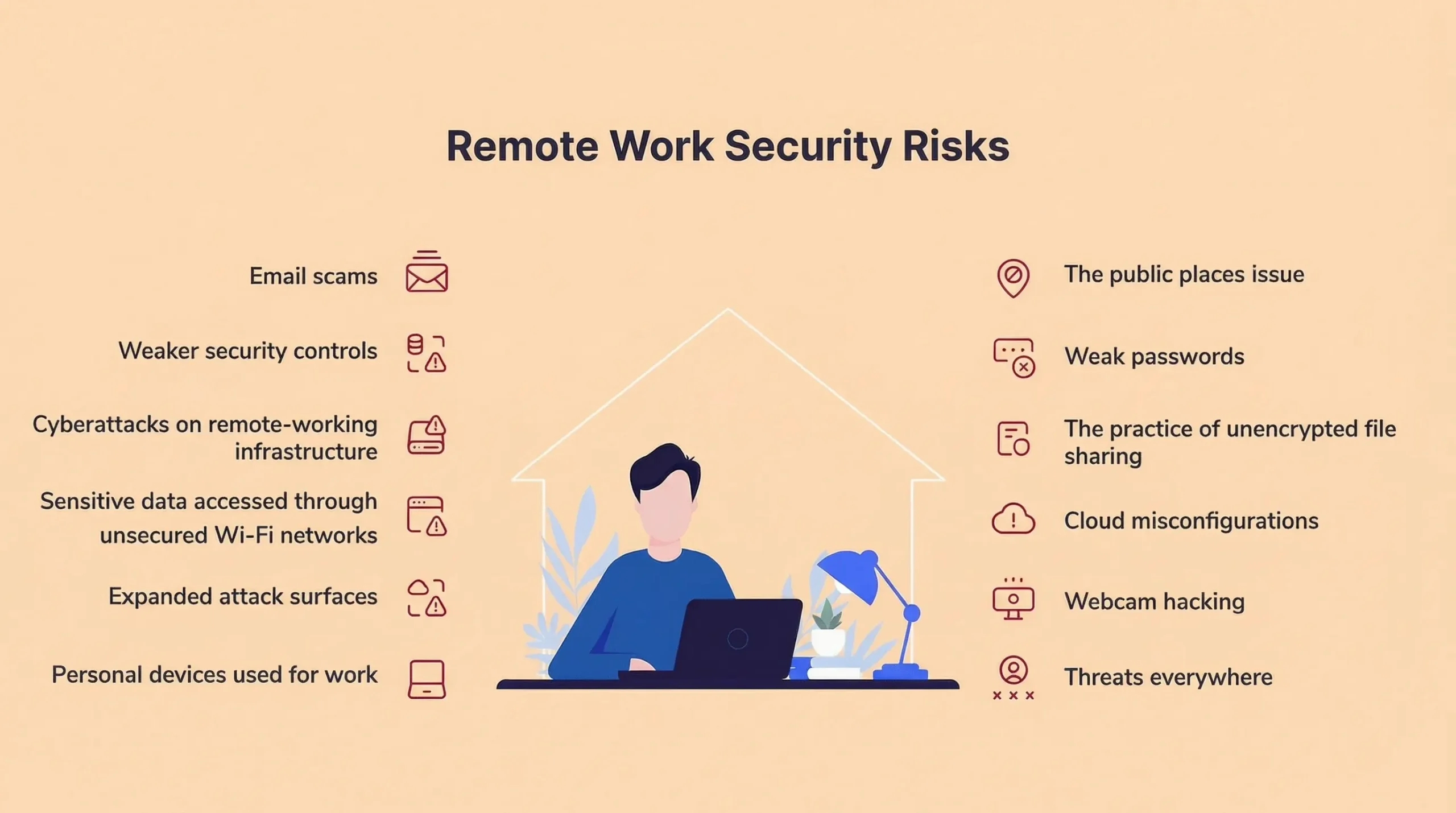
5) Devices & Remote Working
Why it matters for Accountants
Large numbers of accountants are now using laptops and working at home, which increases the risk of data being lost or accessed by people who shouldn’t have access.
What Good Looks Like
- Laptops that are encrypted
- Guidelines for secure home working
- Passwords required to lock screens or devices
- Rules about the use of personal devices clearly communicated
Common pitfalls
- Laptops that are not encrypted
- Devices shared by multiple family members
- No policy or procedure for reporting lost devices
Practical Tips
- Assume devices are lost or stolen
- Use simple rules that can be enforced
- Avoid storing data on local devices where possible
6) User Management & Leavers
Why it matters for Accountants
The use of seasonal staff, contractors, and leavers creates access issues for accountants if the processes for managing them are not done effectively.
What Good Looks Like
- Have a formal joiner/leaver process
- Remove access as soon as an employee/contractor has terminated
- Provide temporary access with a set end date
Common pitfalls
- Leaving employee accounts active long after they were terminated
- Temporary employees using a shared account to access your systems
- Not having records of access changes
Practical Tips
- Ensure that the process for removing access is linked to HR processes.
- Review employee accounts after busy periods.
- Maintain a simple but complete record of employee access.
7) Support Responsiveness & Availability
Why it matters for Accountants
For accountants, there is no margin for error when it comes to IT reliability at tax time or payroll time. A failed IT system can greatly affect accountants when they are trying to meet a deadline, and subsequently have a negative impact on the business.
What Good Looks Like
- Clear response time parameters.
- Defined escalation paths for urgent issues.
- More availability during busy times.
Common pitfalls
- Thinking “normal support” includes working to meet deadlines.
- There is not a process for emergency contacts.
- Not prioritising support during busy periods.
Practical Tips
- Develop a time frame for what supports you expect in high volume times in advance.
- Test escalation pathways before your busy times.
- Keep an easily accessible list of all key contacts.
8) Compliance & Evidence
Why it matters for Accountants
An accountant is not only required to tell you that they “handle your data” properly; they have to prove it.
What Good Looks Like
- Basic written security policies.
- Evidence of access being controlled.
- Back up and training documentation.
- Ability to answer customer questions about your security practices.
Common pitfalls
- Verbal promises only from accountants.
- Making documentation overly complex.
- Confusing compliance and perfection.
Practical Tips
- Keep evidence proportionate to volume of data you have.
- Keep all documentation in one place.
- Review and update documentation annually.
9) IT Planning & Budgeting
Why it matters for Accountants
Poor planning rather than bad luck accounts for the majority of unexpected IT failures.
What Good Looks Like
- Planning hardware lifecycles for your equipment
- Predicting software costs accurately
- Budgeting for resiliency instead of luxury
Common pitfalls
- Failing to replace equipment before way too much wear and tear
- Not having a good upgrade plan
- Spending reactively
Practical Tips
- Replacing devices in accordance with an established schedule
- Aligning business growth with their IT plans
- Avoiding last minute upgrades to equipment
10) Choosing or Reviewing an IT Provider
Why it matters for Accountants
IT providers have access to sensitive data and are a company’s trusted partner.
What Good Looks Like
- Clear roles/responsibilities and reporting procedures
- Knowledge of the nature of the accountancy workflow within your organisation
- The ability to explain processes and procedures, not hide them.
Common pitfalls
- Making a decision based on the lowest price
- Not having any type of documented performance review or evaluation system
- Not having adequate documentation for software and processes
Practical Tips
- Clarifying how your IT Support team will support you during tax season
- Clarifying how you would respond to errors and incidents
- Look for transparency instead of terms/conditions when working with an IT Support team.
90-Day Improvement Roadmap
- Inventory systems and devices
- Review access and backups
- Identify immediate risks
- Fix priority gaps
- Enable multi-factor authentication (MFA)
- Standardise key processes
- Test backups
- Document procedures
- Plan for the next 12 months
FAQs
Reliability, Security, Responsiveness with emphasis on Uptime and Confidentiality.
Very Critical! Based On Client Trust; Regulatory Expectations.
Yes! With sufficient controls; specified policies
Proactive! With expedited escalation and Priority Clarity
You must Respond Immediately, Assess The Level Of Risk And Meet Notification Obligations.
About This Guide
Computer Support Centre created this guide for accountancy practices to understand what reliable and effective IT support looks like in day-to-day operations.
As accountancy businesses operate under a tremendous amount of stress, they deal with highly sensitive data including financial and personal data, strict legal due dates and often rely on computing services at peak times (e.g. tax season). Thus, any IT problem will cause a problem for service delivery to clients, compliance with statutory requirements, and/or the reputation of the firm.
This guide does not recommend any specific technology nor does it complicate compliance; it is a practical, risk-based approach that meets the expectations of UK GDPR. The guide is designed to be a reference for partners, practice managers and decision-makers who want assurance that their IT support is contributing to the efficient, effective and secure operation of their firm, without causing excessive disruption.
Conclusion
In the accounting sector, IT services are not a secondary function, but rather an important component to providing a consistent, dependable and professional level of service to clients.
IT Supports for Accountancy Firms Must be More Than Just Fixing Problems When They Occur, but Provide Systems That Are Available During Busy Times, Provide Protection for Client Confidential Data, Enable Secure Remote Working, and Ensure a Fast Recovery from Events Such As Cyber Attacks or System Failures.
By examining your existing IT arrangements against the guidance principles and checklist set out in this document, you can decrease business interruption, enhance security and give you increased assurance that your technology is benefitting, not creating risk or stress within, your business.