
Turn Your Vision into Success, Let It Fly with Us
Ensure Your Business Is Secure, Compliant & IT-Ready
Common Microsoft 365 Mistakes UK Firms Make
Table of Contents
Introduction: Why Microsoft 365 Is Often Misconfigured
- Microsoft 365 is typically the foundation of the majority of UK small and medium sized business operations. From email, to shared file storage, to Microsoft Teams, and usually provide the day to day operational system of an organisation.
- Due to Microsoft 365 being widely deployed and actually run/in use by so many UK SMEs, there is a false assumption made by many companies, that Microsoft 365 is automatically safe and optimally configured out of the box.
- This is not true and factually, the prevailing conditions within many UK SMEs is that:
- They have experienced a rapid installation of Microsoft 365
- They have been installed with very few administrative policies/settings
- They are often not monitored/reviewed after initial installation
- This creates a variety/kind of gaps comprising:
- A Risk/Cyber Attack Breach - Security
- Non Compliance (eg. UK GDPR)
- Inefficiencies (ie. Staff are Unproductive)
- Cyber Essentials provides clear guidance that the implementation of controls such as Multi Factor Authentication, Role Based Access Control (RBAC) and Secure Configuration are essential and nevertheless, many companies are missing these controls.
- This White Paper will describe the most common Microsoft 365 configuration mistakes being made by UK organisations in 2026, outline risks in simple/layman’s terms, as well as providing information on how to correct these issues.
The 15 Most Common Microsoft 365 Mistakes
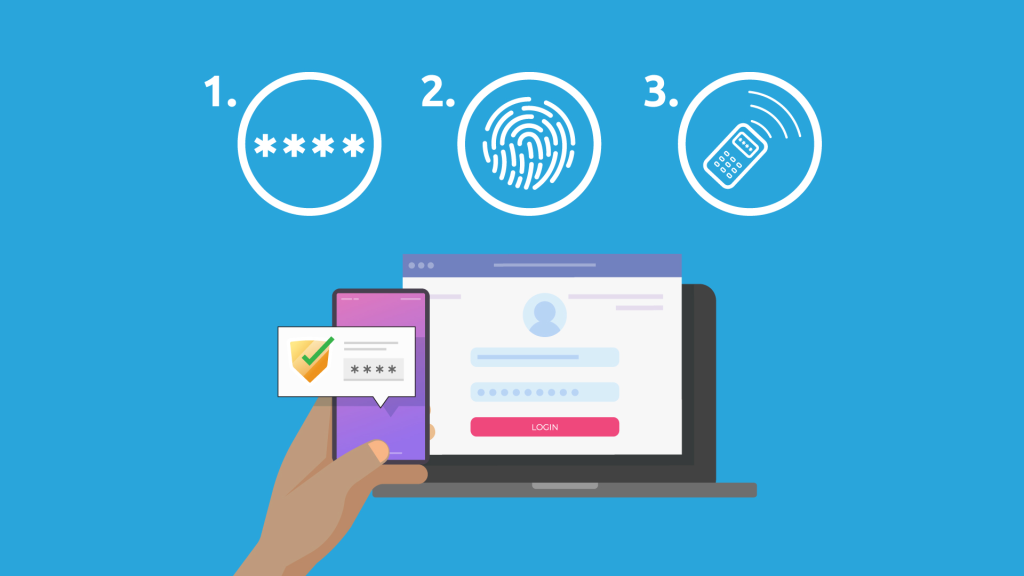
1. Not Enabling Multi-Factor Authentication (MFA)
What it looks like
- The typical scenario: A user logs in with only their password.
- The issue: Passwords are frequently compromised and MFA serves as a deterrent to an intruder gaining access, even if they have already compromised a password.
Why it’s a problem
- Compromised email accounts
- Business Email Compromise (BEC) invoice fraud
- Data breaches
How to fix it
- Enable MFA for all employees
- Use application-based authenticators (not SMS-based)
- This is especially important for your email and admin accounts (those most likely to be attacked).
2. Weak or Reused Passwords
What it looks like
- The typical scenario: An employee uses “Company123” for multiple systems.
- The issue: If the company's network is compromised, the intruder will now have credentials to every other system that this employee has used the same credentials for.
Why it’s a problem
- Compromised multiple systems
- Increased likelihood of the employee committing fraud
How to fix it
- Require usage of longer passwords (14+ characters).
- Require the use of password managers to store passwords.
- Provide a block on the use of common passwords.
3. Allowing Legacy Authentication
What it looks like
- The typical scenario: The use of legacy applications that do not support MFA.
- The issue: An intruder can exploit legacy applications to authenticate to the network without having to pass MFA.
Why it’s a problem
- Accounts compromised without a trace.
How to fix it
- Disable the use of legacy applications.
- Utilise Conditional Access Policies that allow or deny access to specific applications based on user-specific criteria.
4. Over-Permissive SharePoint & OneDrive Sharing
What it looks like
- The typical scenario: Files are shared as “Anyone with the link”.
- The issue: Anyone can access the file if they have the link to it
Why it’s a problem
- Data breach
- Violation of GDPR regulations
How to fix it
- Limit the amount of external sharing done.
- Use link expiration to limit the time frame for access.
- Review and Audit Permissions for shared files.
5. No Backup for Microsoft 365 Data
What it looks like
- Only using Microsoft as a backup medium.
Why it’s a problem
- Once data is deleted or corrupted, it's gone for good.
How to fix it
- Utilize a third-party backup solution,
- validate the backup and restore processes periodically.
6. Poor User Access Control
What it looks like
- Almost all users have too many privileges.
Why it’s a problem
- When users have excessive privileges, it opens your systems up to risk.
How to fix it
- Implement the principle of least privilege, assign roles properly.
7. Not Monitoring Suspicious Logins
What it looks like
- No alerts or right monitoring in place.
Why it’s a problem
- Potential breaches can occur without being noticed.
How to fix it
- Enable alerts on selected accounts,
- Review sign-in logs at least once a month.
8. Lack of Email Security Policies
What it looks like
- Not protecting your email system with structured methods.
Why it’s a problem
- Email is the most common way cybercriminals attack companies.
How to fix it
- Implement the policies and procedures associated with Microsoft Defender for Office 365,
- Enable Safe Links and Safe Attachments in your email configuration.
9. Misconfigured Spam & Phishing Protection
What it looks like
- Default settings not changed.
Why it’s a problem
- Too weak or too lenient.
How to fix it
- Use “Strict” policies where applicable
- Maintain regular reviews
10. No Staff Phishing Training
What it looks like
- Staff rely on gut instinct.
Why it’s a problem
- Humans are the weakest point.
How to fix it
- Provide regular training
- Conduct phishing simulations
11. Ignoring Updates and Changes
What it looks like
- Settings have not been reviewed.
Why it’s a problem
- Threats are always changing.
How to fix it
- Quarterly reviews
- Follow Microsoft recommendations
12. No Device Management or Endpoint Security
What it looks like
- There are no controls over laptops and mobile devices.
Why it’s a problem
- Lost or unsecured devices expose data.
How to fix it
- Implement Intune
- Implement compliance on devices.
13. Using Personal Accounts for Business Data
What it looks like
- Personal email accounts (Gmail, Dropbox) where company files are stored.
Why it’s a problem
- No control or auditability of the accounts.
How to fix it
- Enforce only business accounts
- Prevent access to unauthorised applications
14. No Joiners and Leavers Process
What it looks like
- Employees can still log into their accounts once they have left the company
Why it’s a problem
- Former employees can still log into their accounts.
How to fix it
- Immediately disable the accounts
- Have an access review procedure/protocol in place
15. Poor Use of Teams and File Storage
What it looks like
- Files located all over the place
Why it’s a problem
- Confusion and duplicate files
How to fix it
- Implement structured Teams
- Implement a standardised naming and storage convention for files
Microsoft 365 Security Checklist
- Enable MFA for every user
- Turn off support for old/fallen authentication
- Implement strong password policy
- Set up email protection modes
- Require compliance of devices
- Establish a way to back up your data
- Enable/Set up monitoring and alerts
- Establish restricted sharing for external users
Microsoft 365 Optimisation Checklist
- Create teams in a well-structured way
- Organise SharePoint in a logical manner
- Conduct a review of licensing
- Implement automation using Power Automate
- Remove unused accounts
- Document all Policies
FAQs
It has solid security features you just need to enable them correctly.
Yes, SMEs represent a major segment of overall target for attacks.
Yes; Microsoft backs up your data, but does not provide a comprehensive backup.
At least once every three months.
Some of them may be fixed by working with external experts.
About This Guide
The Computer Support Centre has produced a guide to help UK SMEs learn about typical configuration errors made during setup of Microsoft 365. Many businesses use Microsoft 365 as their main tool for email, file storage, collaboration and communication tools. In most cases, organisations deploy Microsoft 365 much quicker than they move through the security and management setup processes.
This document provides a simple and practical explanation of common MS-365 configuration errors and demonstrates how to resolve those errors. Correcting errors related to user access control, multi-factor authentication, email security/protection and device management will help reduce organisations’ cyber-security risk, improve organisation productivity, and assist with compliance with UK data protection laws and regulations.
Conclusion
The Microsoft 365 platform is considered one of the biggest and best-performing business solutions available today in the UK; however Microsoft 365 does not have built-in security features and optimisations once it has been rolled out.
When Microsoft 365 is initially rolled out, many organisations do not realise they have left significant security gaps within their use of the platform. In many cases, the following types of security are available- authentication, access control, data loss protection, and email security. Because of these security misconfiguration, there are numerous opportunities for cyberattacks, data loss and disruption of operations to occur.
To help reduce the ever-growing amount of risk and increase the security posture of Microsoft 365; by addressing the common mistakes mentioned within this guide and implementing some simple changes to your Microsoft 365 environment (i.e. MFA, permission restrictions, monitoring activity, providing education and training); your organisation can make significant improvements to your overall security.
Implementation of a multiple review process, having a clear, concise policy for using Microsoft 365, and ongoing employee education will help to ensure that Microsoft 365 will provide a secure, efficient and compliant environment for your organisation as your organisation continues to grow.